
Information Management Solutions
Comments: No Comments
The Clock Is Ticking on Classic SharePoint
The clock is ticking for organizations that still rely on “classic” SharePoint sites. Microsoft is retiring classic sites and pages in favor of the modern SharePoint experience. Existing content will remain available, but Microsoft will gradually remove the ability to create, edit, and maintain classic pages. Once this process is complete, any remaining pages will become view-only and content owners will no longer be able to make any updates.
While this SharePoint deprecation can create issues for organizations that still use classic SharePoint, it can also offer significant opportunities to remove outdated content and modernize sites to make them easier to access, navigate, search, and maintain.
What Is Changing and When
Microsoft has provided the following deadlines for when the deprecation of classic SharePoint will be completed; however, as many using classic SharePoint are discovering, the process of limiting functionality has already begun.
- March 1, 2027: Organizations will no longer be able to create new classic publishing sites or turn on the classic publishing feature. In Microsoft 365 environments created on or after this date, users also will not be able to create or edit classic pages. Custom code will be turned off by default.
- October 1, 2028: These limits will apply to remaining Microsoft 365 environments. Existing classic pages will become view-only, meaning users can still read them but cannot update them. Organizations will no longer be able to add or update custom code.
After the above deadlines, organizations will still be able to view these pages but will no longer be able to edit them. Standard list and document library views are not currently impacted, although custom code used within them may be affected.
A Practical Modernization Roadmap
These deadlines may seem far away, but identifying classic pages, understanding how they are used, rebuilding features, and testing new sites are all things that can start now to ensure your system remains functional. The following approach can help organizations complete the transition in manageable steps:
- Find your classic sites and pages. Create a complete list of older sites and pages, who owns them, how often they are used, who can access them, and whether they include forms, workflows, or connections to other systems.
- Decide what still matters. Confirm which content is current and useful. Remove or archive outdated material, preserve required records, and address the most frequently used or business-critical pages first.
- Focus on what each page needs to do. Identify the purpose of the sites and pages, how the navigation works, and any special features. Then choose supported Microsoft 365 tools that work in a modern context.
- Start with a small test group. Modernize less-complex pages first. Check the content, links, images, access settings, navigation, accessibility, mobile display, and related business processes before moving ahead.
- Complete the work in manageable phases. Group similar pages together, document unusual issues, keep the original pages available while the new versions are reviewed, and obtain approval from content owners before directing users to the new sites.
An Opportunity to Modernize
Beyond responding to the slow depreciation of classic sites, modernizing SharePoint offers significant enhancements that improve user experience and overall site performance, including the following:
- Modern, intuitive interface. The user-friendly interface offers improved navigation, responsive layouts, and better accessibility across devices.
- Performance optimization. Modern SharePoint sites have faster load times and enhanced search capabilities for quicker access to information.
- Flexible modern web parts. Web parts are easily added or modified to update site content.
- Custom workflows and automation. Sites integrate directly with Power Automate, Power Apps, and other apps to build custom workflows and forms.
- Seamless Microsoft 365 integration. Seamlessly connect with Teams, OneDrive, Planner, and other Microsoft 365 apps for better collaboration.
How KTL Can Help
Managing a big technology transition such as this can be daunting. KTL can help guide organizations through each stage, from the initial assessment to implementation and ongoing site management. Support includes:
- Inventorying classic sites and pages, identifying their owners, and documenting connected forms, automated processes, and special features.
- Prioritizing content and business processes based on importance, use, and the risk created if pages can no longer be updated.
- Developing a practical schedule and step-by-step transition plan based on business needs, priorities, and available resources.
- Organizing modern sites so information is easier to find, manage, and maintain.
- Building modern SharePoint sites and using tools such as Power Apps and Power Automate when forms or automated processes are needed.
- Helping content owners review and approve information and providing training and guidance for ongoing site management.
Learn more: Microsoft guidance on the deprecation of classic SharePoint pages.

Information Management Solutions
Comments: No Comments
Tech Corner: The Clock Is Ticking on Classic SharePoint
The clock is ticking for organizations that still rely on “classic” SharePoint sites. Microsoft is retiring classic sites and pages in favor of the modern SharePoint experience. Existing content will remain available, but Microsoft will gradually remove the ability to create, edit, and maintain classic pages. Once this process is complete, any remaining pages will become view-only and content owners will no longer be able to make any updates.
While this SharePoint deprecation can create issues for organizations that still use classic SharePoint, it can also offer significant opportunities to remove outdated content and modernize sites to make them easier to access, navigate, search, and maintain.
What Is Changing and When
Microsoft has provided the following deadlines for when the deprecation of classic SharePoint will be completed; however, as many using classic SharePoint are discovering, the process of limiting functionality has already begun.
- March 1, 2027: Organizations will no longer be able to create new classic publishing sites or turn on the classic publishing feature. In Microsoft 365 environments created on or after this date, users also will not be able to create or edit classic pages. Custom code will be turned off by default.
- October 1, 2028: These limits will apply to remaining Microsoft 365 environments. Existing classic pages will become view-only, meaning users can still read them but cannot update them. Organizations will no longer be able to add or update custom code.
After the above deadlines, organizations will still be able to view these pages but will no longer be able to edit them. Standard list and document library views are not currently impacted, although custom code used within them may be affected.
A Practical Modernization Roadmap
These deadlines may seem far away, but identifying classic pages, understanding how they are used, rebuilding features, and testing new sites are all things that can start now to ensure your system remains functional. The following approach can help organizations complete the transition in manageable steps:
- Find your classic sites and pages. Create a complete list of older sites and pages, who owns them, how often they are used, who can access them, and whether they include forms, workflows, or connections to other systems.
- Decide what still matters. Confirm which content is current and useful. Remove or archive outdated material, preserve required records, and address the most frequently used or business-critical pages first.
- Focus on what each page needs to do. Identify the purpose of the sites and pages, how the navigation works, and any special features. Then choose supported Microsoft 365 tools that work in a modern context.
- Start with a small test group. Modernize less-complex pages first. Check the content, links, images, access settings, navigation, accessibility, mobile display, and related business processes before moving ahead.
- Complete the work in manageable phases. Group similar pages together, document unusual issues, keep the original pages available while the new versions are reviewed, and obtain approval from content owners before directing users to the new sites.
An Opportunity to Modernize
Beyond responding to the slow deprecation of classic sites, modernizing SharePoint offers significant enhancements that improve user experience and overall site performance, including the following:
- Modern, intuitive interface. The user-friendly interface offers improved navigation, responsive layouts, and better accessibility across devices.
- Performance optimization. Modern SharePoint sites have faster load times and enhanced search capabilities for quicker access to information.
- Flexible modern web parts. Web parts are easily added or modified to update site content.
- Custom workflows and automation. Sites integrate directly with Power Automate, Power Apps, and other apps to build custom workflows and forms.
- Seamless Microsoft 365 integration. Seamlessly connect with Teams, OneDrive, Planner, and other Microsoft 365 apps for better collaboration.
How KTL Can Help
Managing a big technology transition such as this can be daunting. KTL can help guide organizations through each stage, from the initial assessment to implementation and ongoing site management. Support includes:
- Inventorying classic sites and pages, identifying their owners, and documenting connected forms, automated processes, and special features.
- Prioritizing content and business processes based on importance, use, and the risk created if pages can no longer be updated.
- Developing a practical schedule and step-by-step transition plan based on business needs, priorities, and available resources.
- Organizing modern sites so information is easier to find, manage, and maintain.
- Building modern SharePoint sites and using tools such as Power Apps and Power Automate when forms or automated processes are needed.
- Helping content owners review and approve information and providing training and guidance for ongoing site management.
Learn more: Microsoft guidance on the deprecation of classic SharePoint pages.

Hazardous Materials Management Built through MS 365
For many organizations, hazardous materials management is not constrained by a lack of effort. The bigger challenges often lie in disconnected systems, lean staffing, and the ongoing need to keep regulatory information, records, and institutional knowledge organized. Southeast Missouri State University (SEMO) faced these pressures across a complex campus environment and needed a practical, sustainable way to manage environmental compliance and hazardous materials without adding unnecessary software complexity.
The case study below highlights how effective hazardous materials management depends less on buying a standalone system and more on designing clear processes, centralizing reliable information, and making compliance tasks easier for the people who perform them. SEMO’s solution did just that by leveraging tools already familiar to many organizations: Microsoft SharePoint and the Power Platform.
Challenge: Too Many Requirements, Too Few Resources
SEMO’s environmental, health, and safety (EHS) responsibilities span a broad campus footprint: approximately 9,000 students, 1,100 employees, 397 acres, 99 buildings, about 100 laboratories, and 17 residence halls. The University’s EHS profile further includes dual-fuel and natural gas boilers, generators, oil storage tanks, a Title V air permit, a Municipal Separate Storm Sewer System (MS4) permit, a Spill Prevention, Control, and Countermeasure (SPCC) Plan, and hazardous waste small quantity generator (SQG) obligations.
The scale of SEMO’s operation creates a significant documentation and coordination burden, especially when hazardous materials, environmental permits, inspections, training, and waste activities must be managed consistently. And with only two EHS Facilities Management team members, the University needed processes that were visible, repeatable, and less dependent on individual staff capacity to manage, sustain, and communicate compliance.
Drivers: Practical Needs, Budget Constraints, and Continuity
SEMO’s immediate need was not to collect more EHS information; it was to make that information usable. SEMO needed better systems for managing general EHS information, Safety Data Sheet (SDS) management, chemical inventory management, and hazardous waste tracking, along with a way to preserve institutional knowledge and maintain continuity when staffing changes occurred.
Budget was also a design constraint. Commercial EHS software can be expensive and difficult to justify within a Facilities Management budget, so SEMO needed a solution that delivered meaningful functionality while avoiding a major new software investment.
Solution: A Compliance-Focused SharePoint and Power Platform Management System
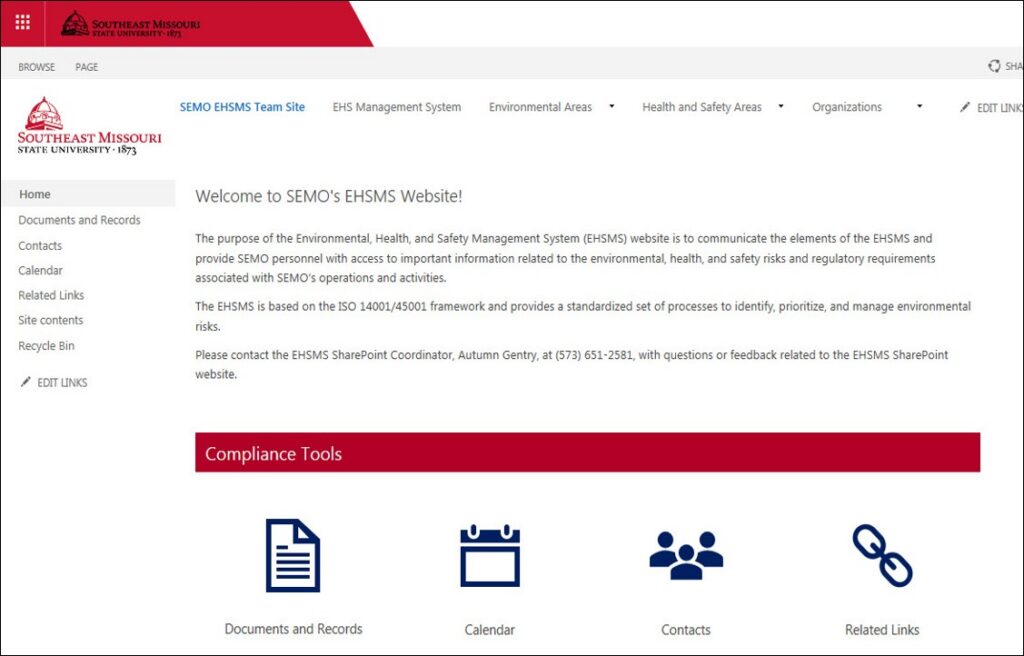
SEMO worked with KTL to build the system from a compliance-first foundation. The project began with an environmental compliance audit and report, followed by an EHS management system assessment. Those findings informed development of a broader EHS compliance management system that used SEMO’s existing Microsoft 365 environment and the Power Platform to connect webpages, documents, data, mobile forms, and automated notifications in one familiar platform.
Recent enhancements focused on hazardous materials management capabilities within the larger EHS compliance management system. Each tool was designed to address a specific operational need: knowing what materials are on campus, standardizing waste pickup requests, documenting waste determinations, and maintaining training records.
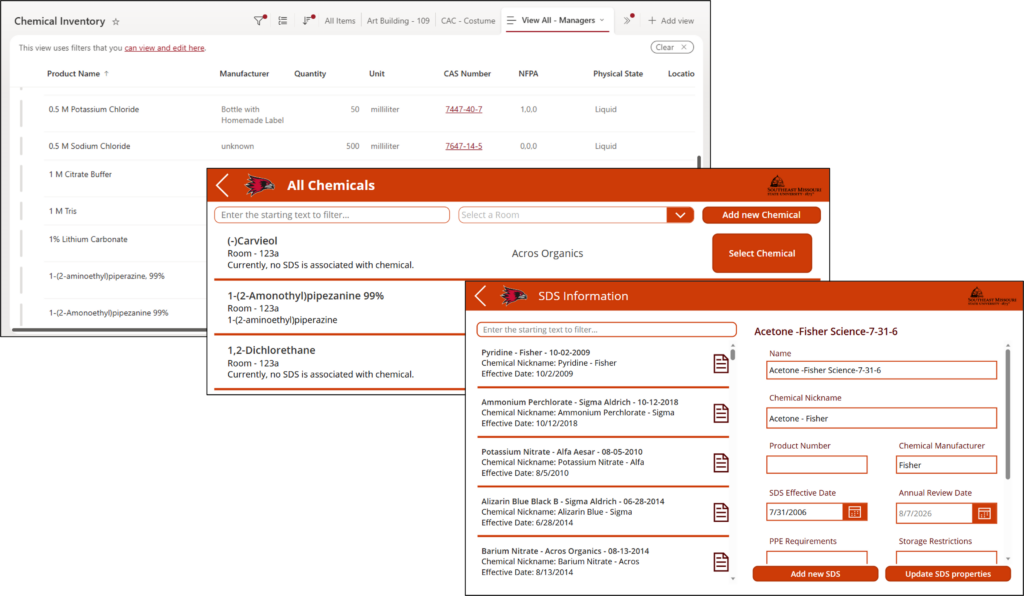
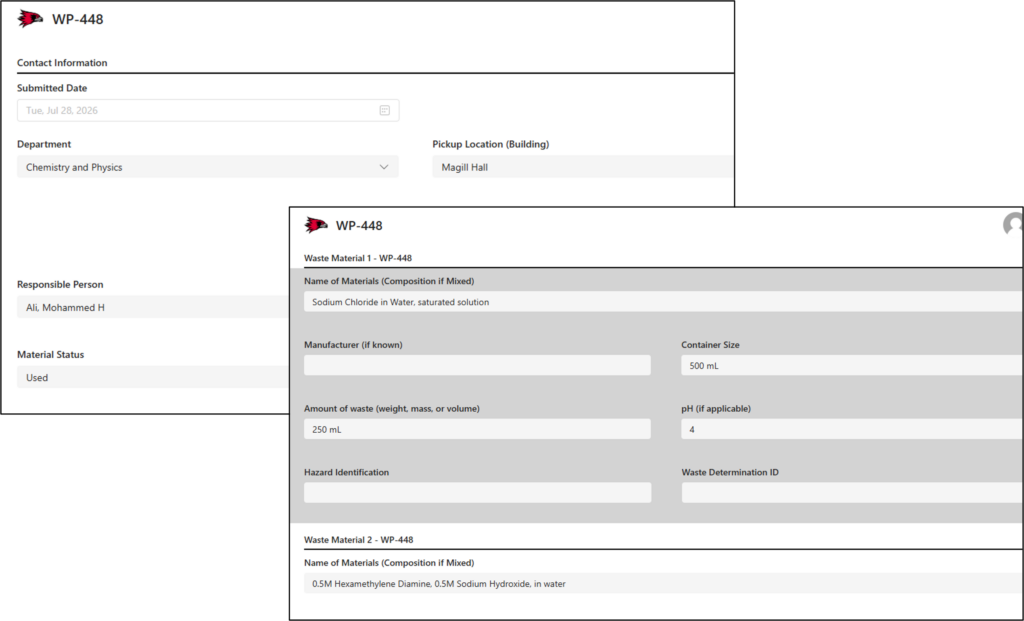
- Chemical Inventory Tool gives SEMO a structured way to view and manage chemicals throughout campus. Chemicals are associated with rooms and maintained alongside PDFs of related SDSs, inventory details, hazard information, and CAS numbers. Through a web-based interface, users can search, filter, and access records for the rooms they manage, improving visibility into what materials are present, where they are located, and what hazards are associated with them. The Chemical Inventory Tool also generates a list of chemicals that need to be reported, making regulatory reporting easier and more streamlined.
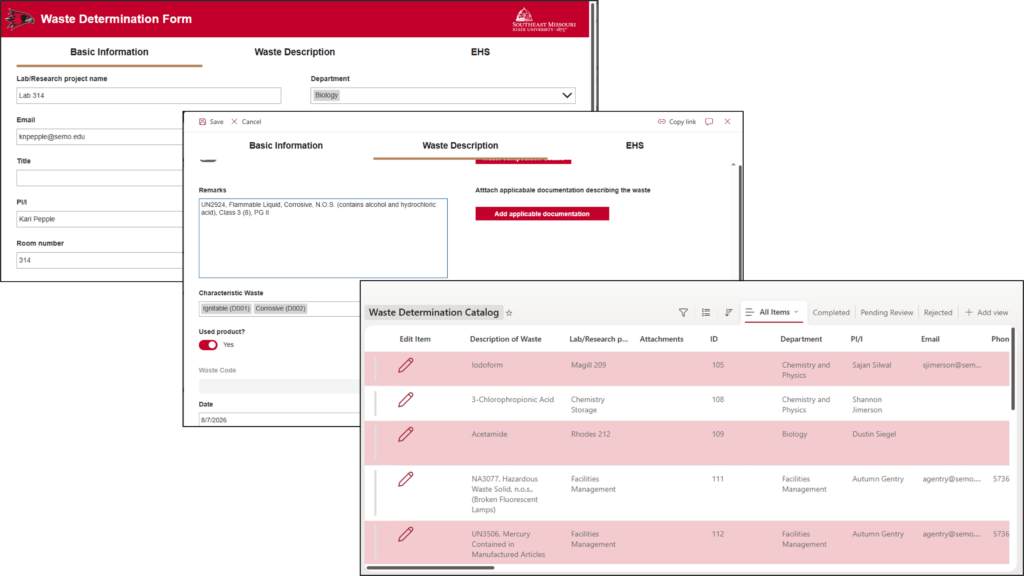
- Waste Pickup Process and Notification Workflow allows staff to request waste chemical pickups through a defined process instead of relying on informal disposal decisions. The workflow supports request submission, routing to EHS, waste determination, and notifications. This reduces manual follow-up, improves response consistency, and creates a clearer record of pickup activity.
- Waste Determination Form supports the Waste Pickup Process by providing a structured process for disposal decisions. It captures basic information, waste properties, characteristics, constituents, attachments, RCRA values, review status, and EHS determinations. Completed waste determinations can then be referenced in future waste pickups to support proper disposal.
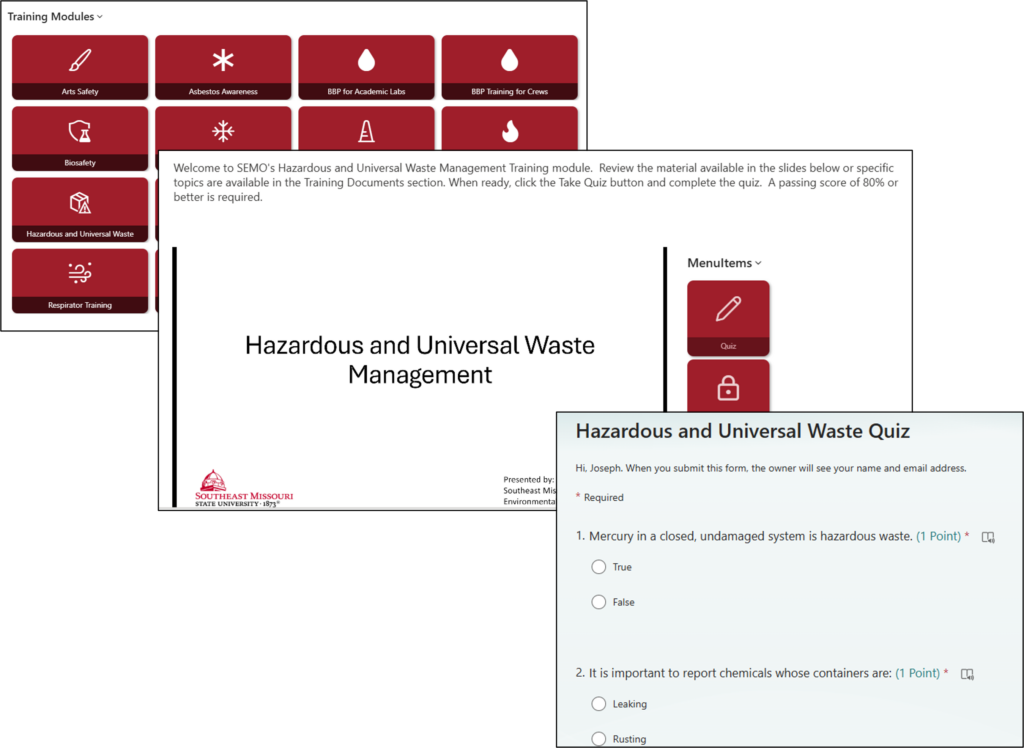
- Lab Safety Training Module supports standardized training delivery and documentation for students and faculty using University laboratories. This helps SEMO maintain training records and reinforce consistent expectations for personnel working with hazardous materials.
Results and Benefits
By developing an EHS compliance management system with dedicated hazardous materials management tools in SharePoint and the Power Platform, KTL helped SEMO create a more sustainable model for managing EHS compliance. The system centralizes records, improves document retrieval, supports regulatory inspection readiness, monitors performance, and creates a stronger foundation for continual improvement. It also captures institutional knowledge, so essential processes are less dependent on one person’s habits, memory, or manner of organizing files.
For organizations already using Microsoft 365, this approach can reduce barriers to adoption because users work in a familiar environment, IT can support the platform internally, and the organization can adapt forms, lists, workflows, dashboards, and pages as needs evolve. As SEMO has demonstrated, effective EHS compliance and hazardous materials management do not always require a large software purchase. With the right framework, clear process design, and thoughtful use of SharePoint and the Power Platform, organizations can centralize information, reduce administrative burden, preserve institutional knowledge, and strengthen regulatory compliance using tools they already have.

Tech Corner: KTL Assessment App
All types of organizations and operational processes demand a variety of audits and assessments to evaluate compliance with requirements, ranging from government regulations, to industry codes, to management system standards (e.g., ISO, GFSI), to internal obligations. Audits and assessments capture regulatory compliance status, management system conformance, supplier compliance, adequacy of internal controls, potential risks, and best practices. In short, audits and assessments are essential for improving and verifying compliance performance, internal controls, potential risks, and best practices.
Having the right tool for the job can make audits significantly more efficient. This includes the protocol and templates developed as part of pre-audit preparation, as well as audit/assessments tools that may be used to conduct and manage audits more efficiently and effectively. The KTL Assessment App is a comprehensive audit management solution built on the Microsoft Power Platform and Dataverse that enables organizations to more efficiently create, manage, and execute audits, while managing and tracking corrective actions.
Functionality: What does it do?
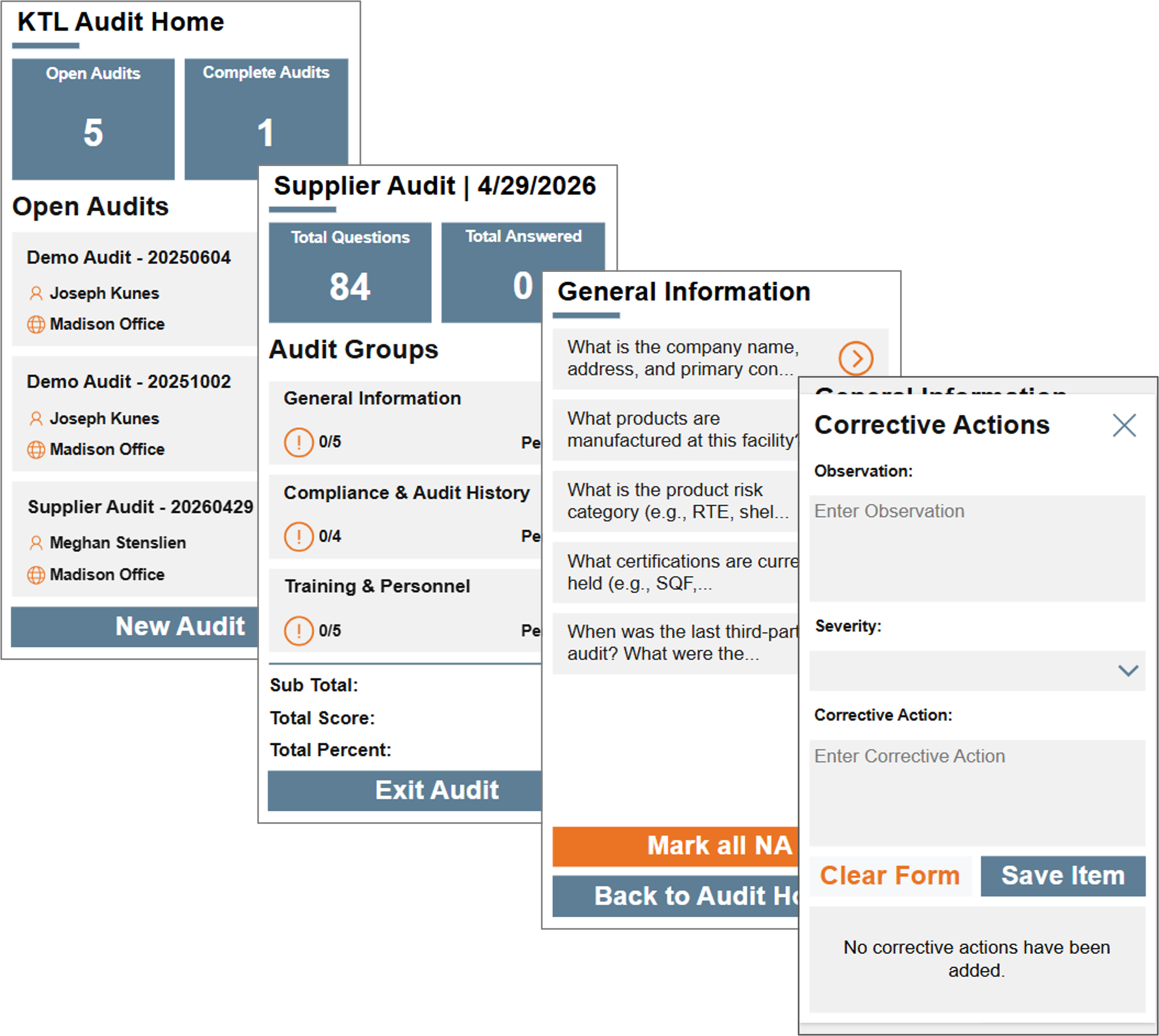
KTL’s Assessment App supports the entire audit lifecycle. Users can conduct audits and assessments from desktop or mobile devices, record responses, capture comments, attach photos, track progress, and assign corrective actions. The app features a fully customizable framework that enables organizations to build robust audit programs tailored to their specific regulatory, operational, and business requirements.
The solution works through three applications:
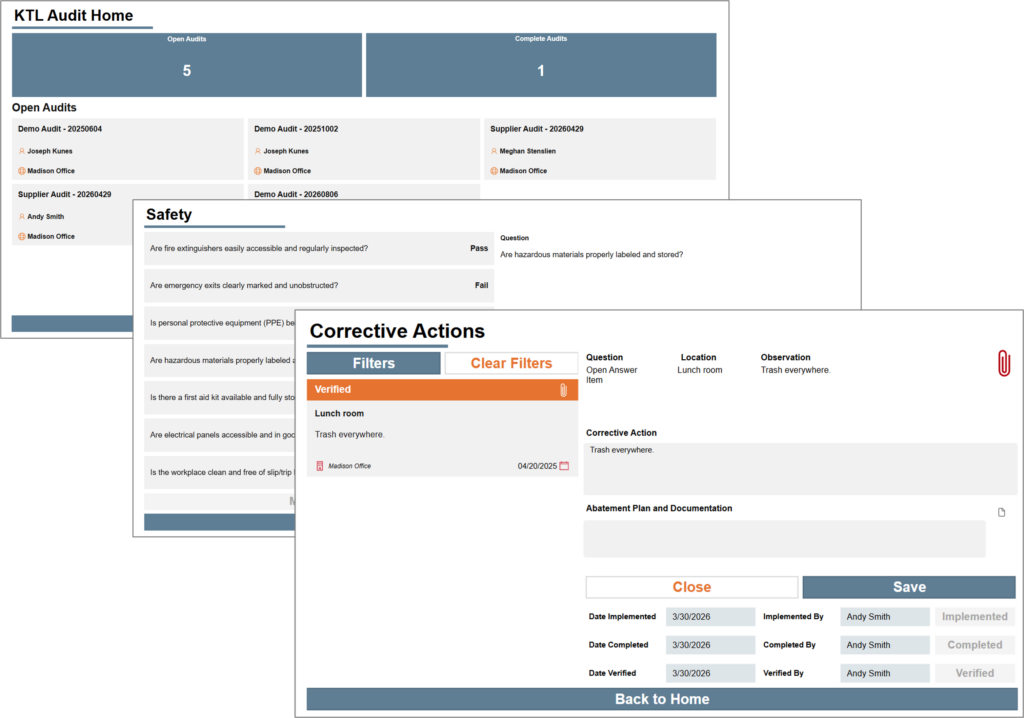
- Assessment Report App: The Assessment Report App allows managers to review audit findings and manage corrective actions. The application supports PDF report generation and sharing to improve communication and compliance documentation.
- Assessment Management App: The Assessment Management App serves as the administrative hub. Administrators can create and manage assessment templates, data, and configuration settings.
- Assessment App: The Assessment App is the primary user-facing application used to conduct audits and assessments. Available on desktop and mobile devices, it allows auditors to view audits, answer questions, upload supporting evidence, and track progress. Scoring and progress tracking provide real-time insight into assessment progress.
Benefits: Why do you need it?
KTL’s Assessment App helps organizations manage audits and assessments more consistently, efficiently, and transparently. By centralizing setup, execution, reporting, and corrective action tracking, the app improves visibility into audit status, strengthens accountability, and supports better compliance decision-making.
- Program setup and administration: Add and manage users, locations, standards, audit types, assessment templates, and scoring models.
- Audit execution: Record responses, comments, and supporting evidence; monitor assessment progress and completion status in real time; and automatically calculate scores throughout the audit process.
- Reporting and decision support: Generate reports and PDF summaries that support compliance reviews and provide management with clear information for decision-making.
- Corrective action management: Track corrective actions to ensure findings are assigned, addressed, and resolved.
- Data security: Protect assessment data through role-based access controls and permissions.
With assessment management, automation, reporting, and corrective action tracking in one platform, KTL’s Assessment App gives organizations a more reliable way to manage audit programs, capture compliance status, identify trends, and drive continuous improvement.
Technology Used
- Dataverse
- Power Apps
- Power Automate

Environment / Food Safety / Information Management Solutions / KTL News / Quality / Safety
Comments: No Comments
Don’t Miss KTL at the WCA Annual Training Conference
KTL will be exhibiting at the Wisconsin Correctional Association’s (WCA) 2026 Annual Training Conference in Wisconsin Dells September 20-22, 2026. WCA hosts this annual statewide conference to bring together correctional professionals, students, and leaders across the criminal justice system. The event supports collaboration, professional development, and meaningful dialogue around the future of corrections.
Be sure to stop by and visit KTL at our exhibit booth (#18). We’ll be sharing more about our EHS, food safety, and Microsoft 365 information management solutions. We look forward to connecting with you in the Dells!

KTL to Present on Information Management and Safety Culture
KTL will be a featured presenter and exhibitor at the 2026 Chicagoland Safety, Health & Environmental Conference in Naperville, Illinois, September 14-16, 2026. The Conference provides timely and relevant environmental management, safety, health, professional development and OSHA/EPA compliance training to EHS professionals, business owners, facility managers, plant managers, supervisors, safety committee members, human resources managers, municipalities, and others who have safety, health, and environmental management and compliance responsibilities.
KTL Sessions
Session T05: EHS Data Management: A DIY Approach | Tuesday, September 15, 8:30-10:00 am CT
Building an EHS compliance management system doesn’t have to be complicated or expensive—not when most companies already have the software they need. Learn how to build data management tools to collect, track, and report EHS compliance information using the latest Microsoft 365 and Power Platform apps. This session will walk through key features and functionality of an EHS compliance management system, discuss the importance of a plan-do-check-act development approach, and provide tips to ensure successful development and implementation. See working examples and hear directly from EHS and IT experts on how to leverage familiar Microsoft tools to cost-effectively elevate EHS processes and management systems and drive ongoing compliance.
Session W18: Framework for Creating a Best-in-Class Safety Culture | Wednesday, September 16, 1:15-2:45 pm CT
High-profile incidents in industries from energy to manufacturing demonstrate that safety compliance alone is not enough—organizational culture determines whether safety systems thrive or fail. Consistent with OSHA’s Recommended Practices for Safety and Health Programs and ISO 45001, this session outlines a practical framework for building a best-in-class safety culture focused on ten key attributes: leadership, values, goals and initiatives, organization and structure, employee engagement, resource allocation, systems and standards, metrics and reporting, continual learning, and verification and auditing. This presentation will help professionals create a Safety Culture Action Plan that moves the organization beyond short-term initiatives toward sustainable cultural excellence through proven implementation techniques. Participants will gain actionable insights to strengthen their own safety cultures, improve safety outcomes, reduce incidents, and create organizational resilience.
Stop by KTL’s booth (#101) to talk more about your safety, health, and environmental needs. We look forward to connecting with you in Naperville!

KTL to Co-Present on Hazardous Materials Management at CUHMMC
KTL will be attending at the 2026 College & University Hazardous Materials Management Conference (CUHMMC) at the University of Minnesota – Twin Cities August 9-12, 2026. CUHMMC is the premier higher education hazmat conference, bringing together the EHS leaders from across higher education to discuss the challenges faced in an academic environment and solutions and best practices that have been implemented at peer institutions.
KTL will be co-presenting with Southeast Missouri State University (SEMO) on Using Microsoft SharePoint and the Power Platform for Hazardous Materials Management. This presentation will discuss how educational facilities can use Microsoft SharePoint and the Power Platform to develop hazardous materials data management tools. We will provide an overview of how the Microsoft platform can be used to address university-specific needs and will demonstrate tools such as a chemical inventory app, waste determination register, waste pick-up workflow, and a training management system.
We look forward to connecting with you in Minneapolis!

Environment / Food Safety / Information Management Solutions / Quality / Safety
Comments: No Comments
Tech Corner: Electronic Standards Register
Functionality: What does it do?
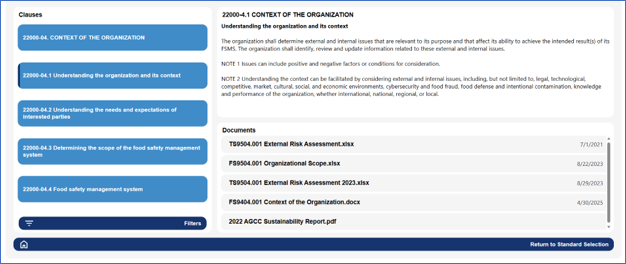
Certification standards help assure customers, suppliers, regulators, and stakeholders that an organization’s products, services, and management systems meet recognized best practices. These standards are not static. Requirements continue to evolve as certification bodies respond to new risks, regulatory expectations, sustainability priorities, technology changes, and global benchmarking requirements. These updates can quickly create gaps if requirements are tracked manually or inconsistently, especially for companies certified to more than one overlapping scheme.
Recent and upcoming updates to SQF, FSSC 22000, ISO 14001, ISO 9001, and other ISO-based management system standards make it increasingly important for organizations to maintain a structured, current view of the requirements that apply to them. KTL’s electronic standards register organizes certification requirements into an online tool, allowing teams to track applicable clauses, map supporting documents, assign responsibilities, and monitor version changes across multiple standards.
Benefits: Why do you need it?
KTL’s electronic standards register is more than a document management tool. It provides the framework for monitoring change, assigning ownership, documenting implementation, and demonstrating that the organization has evaluated and responded to new or revised requirements in a timely, controlled manner. This is especially valuable during standards transitions to ensure the organization is complying with the most recent version.
An electronic standards register:
- Maps the organization’s documents to specific certification standard requirements.
- Identifies common requirements and allows documentation to be linked between standards, as needed.
- Maintains version control by tracking the current standard, upcoming revisions, transition deadlines, and changes that may affect procedures, records, training, and audit evidence.
- Supports proactive gap assessments when standards are revised, helping teams identify where policies, programs, forms, and responsibilities need to be updated before certification audits.
- Reduces the risk of missed updates when an organization manages multiple certification schemes, sites, departments, or document owners.
- Helps the internal audit team to complete and keep notes for the internal audit.
- Supports management review, internal audit planning, corrective action tracking, and communication across functions.
Technology Used
- Power Apps
- SharePoint

Information Management Solutions
Comments: No Comments
Tech Corner: Are Your Workflows Working?
Many SharePoint compliance management systems incorporate automated processes powered by workflows to streamline repetitive business processes and keep operations moving. Workflows help streamline manual tasks to maximize resources and increase efficiency. When these workflows break, companies can experience stalled approvals, missed communications, and shift back to manual workarounds.
Recently, many workflows in SharePoint stopped working. So, what happened?
The Root Cause: End of SharePoint Designer Workflows
For years SharePoint relied on workflows built in SharePoint Designer to automate repetitive business processes like approvals, notifications, and task management. However, these workflows were built on legacy technology that does not align with Microsoft’s modern, cloud-first direction. As a result, Microsoft set April 2, 2026, as the official end-of-life for the legacy workflows.
In short, that means workflows that have worked seamlessly for years have been turned off, with no warnings for when the workflows don’t run. In most cases, the only sign of an issue is that critical business processes suddenly stop functioning. This leads to inconsistent manual workarounds, or, in some cases, important tasks just not being completed.
Modern Workflow Solutions
The good news is that legacy workflows can be replaced with modern Microsoft tools, such as Power Automate, Azure Logic Apps, and Co-Pilot Agent Flows.
- Power Automate provides a user-friendly, low-code platform for building approval processes, notifications, and integrations directly within the Microsoft 365 ecosystem.
- Azure Logic Apps offer advanced capabilities, including robust integration and greater control over workflow logic for more complex or enterprise-scale scenarios.
- Co-Pilot Agent Flows introduce deep artificial intelligence (AI) integration into the traditional workflow process, enhancing automation with intelligent decision-making.
These modern tools offer several key advantages to legacy Designer workflows:
- Enhanced Functionality: Modern workflows integrate with hundreds of connectors across Microsoft 365 and third-party services (e.g., Teams, Outlook, Dynamics, Salesforce).
- User-Friendly Design: The user interfaces feature a low-code/no-code interface that simplifies workflow creation and maintenance, making automation more accessible to business users.
- Improved Monitoring and Governance: Built-in analytics and monitoring tools provide greater visibility into workflow performance.
- AI-Driven Automation: Modern workflows incorporate AI to enhance decision-making, automate content generation, and provide intelligent recommendations.
Getting Your Workflows Working
If you think your workflows are no longer working, leveraging SharePoint experts who can take a structured approach to replacing Designer workflows can help effectively restore them:
- Assess: Inventory all existing workflows, evaluate which workflows aren’t functioning, identify critical processes, and determine what needs to be migrated, redesigned, or retired.
- Plan: Determine how each workflow will be recreated, accounting for functional differences and opportunities for improvement.
- Migrate: Rebuild workflows using modern tools, testing thoroughly to ensure they meet business requirements and function as expected.
- Optimize: Take advantage of modern capabilities to enhance workflows, integrate additional systems, and improve overall efficiency.
It’s important to note that there is no direct one-to-one conversion from SharePoint Designer workflows to modern workflows. Many workflows will need to be reimagined rather than simply recreated. While this requires effort, it also presents an opportunity to improve processes and reduce complexity.
Moving Forward
The end of SharePoint Designer workflows is no longer a distant future consideration; it is a current reality that organizations must address. Without migration to modern solutions, business processes will continue to fail, leading to disruptions and inefficiencies.
If your organization relied on SharePoint Designer workflows, KTL can help you navigate this required transition by assessing your current environment, redesigning workflows, and implementing modern solutions that restore and improve functionality. Reach out today to schedule a no-obligation demo and ensure your SharePoint environment continues to run effectively.

Information Management Solutions
Comments: No Comments
Tech Corner: Top 10 Tips to Use the Software You Have
Building a compliance management system doesn’t have to be complicated or expensive, especially when most companies already have the software they need at their fingertips. With the right strategy and expertise, Microsoft (MS) 365 and the Power Platform can be configured into a dynamic compliance management system that collects and centralizes data, streamlines processes, and strengthens compliance performance.
Here are KTL’s top 10 tips to guide the development of a robust compliance management system that scales with your organization’s needs:
- Understand the software you have. If you use Outlook, Word, Excel, or SharePoint, that means your organization is already operating on MS 365. These tools already provide a strong foundation for building a compliance management system. The Power Platform (e.g., Power Apps, Power Automate, Power BI) further extends MS 365 with tools to create custom applications, workflows, and dashboards.
- Leverage existing licenses to control costs. Off-the-shelf compliance management systems can be expensive. Developing compliance tools inside your existing MS 365 tenant minimizes costs by using infrastructure and licenses you already own. This also increases user adoption, because the platform is familiar.
- Start with a clear plan. Structured planning helps capture current processes, identify gaps, and define priorities for development.Set priorities based on compliance risk, desired business improvements, ease of implementation, and overall value.
- Understand your regulatory requirements. Before building any system components, invest time in understanding all relevant regulations and standards. This ensures the platform aligns with actual needs rather than assumptions, reducing rework later in the process.
- Clearly define roles and responsibilities. A strong compliance management system depends on clear ownership. Define who is responsible for data inputs, reviews, decision making, and maintenance. Leveraging cross-functional teams helps ensure visibility and operational alignment across the organization.
- Design with scalability in mind. Small wins can encourage early adoption (e.g., creating a SharePoint document library or converting a paper checklist into a digital form using Power Apps). Plan your system so it can grow over time. Design should allow for efficient scale-up.
- Incorporate existing processes and tools. Evaluate your current systems, tools, and workflows. Incorporating what already works helps reduce redundancy, minimize training needs, and encourage adoption of the new system. Consider where new or existing data sources can be integrated for a more complete compliance picture.
- Move at a pace that fits your resources. Develop the system in phases aligned with your budget, staffing, and operational priorities. Incremental development allows teams to learn, adapt, and refine processes without overwhelming them.
- Integrate AI to enhance efficiency and insight. Modern AI tools, like MS Copilot, can help streamline compliance tasks by automatically summarizing documents, extracting key information, identifying trends, and assisting with data entry.
- Leverage trends and continuous improvement. Use the data your system generates to drive ongoing operational and compliance improvements. Trends and analytics reveal opportunities, highlight recurring issues, and support more informed decision-making, which ultimately strengthens your compliance program over time.
MS 365 is more than email and file storage. It is a powerful, adaptable platform that can be used to manage compliance obligations, from document control and data entry to inspections, workflows, compliance task management, and reporting. By leveraging the tools your organization already has, you can create cost-effective, customized compliance solutions that improve performance, streamline processes, and foster long-term compliance.