
Environment / Food Safety / Information Management Solutions / Quality / Safety
Comments: No Comments
Functionality: What does it do?
Certification standards help assure customers, suppliers, regulators, and stakeholders that an organization’s products, services, and management systems meet recognized best practices. These standards are not static. Requirements continue to evolve as certification bodies respond to new risks, regulatory expectations, sustainability priorities, technology changes, and global benchmarking requirements. These updates can quickly create gaps if requirements are tracked manually or inconsistently, especially for companies certified to more than one overlapping scheme.
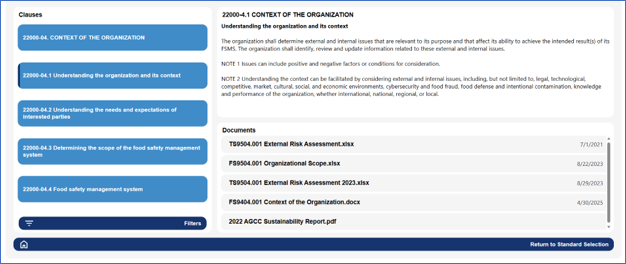
Recent and upcoming updates to SQF, FSSC 22000, ISO 14001, ISO 9001, and other ISO-based management system standards make it increasingly important for organizations to maintain a structured, current view of the requirements that apply to them. KTL’s electronic standards register organizes certification requirements into an online tool, allowing teams to track applicable clauses, map supporting documents, assign responsibilities, and monitor version changes across multiple standards.
Benefits: Why do you need it?
KTL’s electronic standards register is more than a document management tool. It provides the framework for monitoring change, assigning ownership, documenting implementation, and demonstrating that the organization has evaluated and responded to new or revised requirements in a timely, controlled manner. This is especially valuable during standards transitions to ensure the organization is complying with the most recent version.
An electronic standards register:
- Maps the organization’s documents to specific certification standard requirements.
- Identifies common requirements and allows documentation to be linked between standards, as needed.
- Maintains version control by tracking the current standard, upcoming revisions, transition deadlines, and changes that may affect procedures, records, training, and audit evidence.
- Supports proactive gap assessments when standards are revised, helping teams identify where policies, programs, forms, and responsibilities need to be updated before certification audits.
- Reduces the risk of missed updates when an organization manages multiple certification schemes, sites, departments, or document owners.
- Helps the internal audit team to complete and keep notes for the internal audit.
- Supports management review, internal audit planning, corrective action tracking, and communication across functions.
Technology Used
- Power Apps
- SharePoint