
Information Management Solutions
Comments: No Comments
Tech Corner: Top 10 Tips to Use the Software You Have
Building a compliance management system doesn’t have to be complicated or expensive, especially when most companies already have the software they need at their fingertips. With the right strategy and expertise, Microsoft (MS) 365 and the Power Platform can be configured into a dynamic compliance management system that collects and centralizes data, streamlines processes, and strengthens compliance performance.
Here are KTL’s top 10 tips to guide the development of a robust compliance management system that scales with your organization’s needs:
- Understand the software you have. If you use Outlook, Word, Excel, or SharePoint, that means your organization is already operating on MS 365. These tools already provide a strong foundation for building a compliance management system. The Power Platform (e.g., Power Apps, Power Automate, Power BI) further extends MS 365 with tools to create custom applications, workflows, and dashboards.
- Leverage existing licenses to control costs. Off-the-shelf compliance management systems can be expensive. Developing compliance tools inside your existing MS 365 tenant minimizes costs by using infrastructure and licenses you already own. This also increases user adoption, because the platform is familiar.
- Start with a clear plan. Structured planning helps capture current processes, identify gaps, and define priorities for development.Set priorities based on compliance risk, desired business improvements, ease of implementation, and overall value.
- Understand your regulatory requirements. Before building any system components, invest time in understanding all relevant regulations and standards. This ensures the platform aligns with actual needs rather than assumptions, reducing rework later in the process.
- Clearly define roles and responsibilities. A strong compliance management system depends on clear ownership. Define who is responsible for data inputs, reviews, decision making, and maintenance. Leveraging cross-functional teams helps ensure visibility and operational alignment across the organization.
- Design with scalability in mind. Small wins can encourage early adoption (e.g., creating a SharePoint document library or converting a paper checklist into a digital form using Power Apps). Plan your system so it can grow over time. Design should allow for efficient scale-up.
- Incorporate existing processes and tools. Evaluate your current systems, tools, and workflows. Incorporating what already works helps reduce redundancy, minimize training needs, and encourage adoption of the new system. Consider where new or existing data sources can be integrated for a more complete compliance picture.
- Move at a pace that fits your resources. Develop the system in phases aligned with your budget, staffing, and operational priorities. Incremental development allows teams to learn, adapt, and refine processes without overwhelming them.
- Integrate AI to enhance efficiency and insight. Modern AI tools, like MS Copilot, can help streamline compliance tasks by automatically summarizing documents, extracting key information, identifying trends, and assisting with data entry.
- Leverage trends and continuous improvement. Use the data your system generates to drive ongoing operational and compliance improvements. Trends and analytics reveal opportunities, highlight recurring issues, and support more informed decision-making, which ultimately strengthens your compliance program over time.
MS 365 is more than email and file storage. It is a powerful, adaptable platform that can be used to manage compliance obligations, from document control and data entry to inspections, workflows, compliance task management, and reporting. By leveraging the tools your organization already has, you can create cost-effective, customized compliance solutions that improve performance, streamline processes, and foster long-term compliance.

Tech Corner Q&A: Supplier Management System
A wider reaching global supply chain exposes the products we consume—and those companies within the supply chain—to increased risk. A robust Supplier Management Program that leverages software, standardized tools, and data management practices can help organizations to more effectively audit, monitor, and manage supplier performance and program implementation and help ensure high-quality, safe, and consistent products.
We recently sat down with KTL’s Power Platform Team to talk about how organizations can leverage Microsoft 365 and the Power Platform to effectively manage supplier data and performance to improve overall operations.
Q: What does a Supplier Management System do? What capabilities does it have?
Supplier management is about keeping vendors and suppliers organized and ensuring they meet organizational (i.e., internal), regulatory, and applicable third-party certification expectations. Supplier management may include supplier selection and approval, qualification review, contract negotiation, periodic evaluations, and documentation and records management.
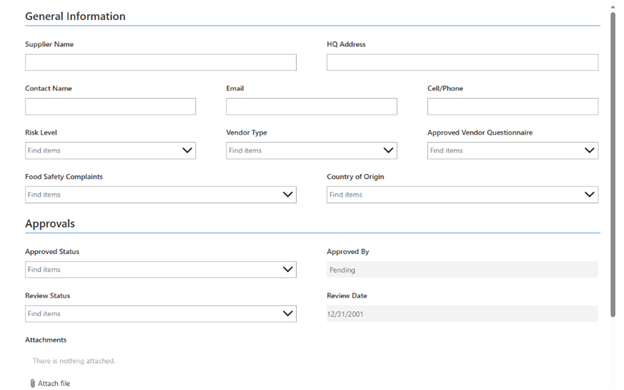
KTL’s Supplier Management System is a custom tool built using Microsoft 365 and the Power Platform that streamlines how an organization approves and manages suppliers, helps control costs and reduce risk, and supports compliance with internal requirements and regulations (e.g., Food Safety Modernization Act (FSMA) Foreign Supplier Verification Program (FSVP) Rule).
KTL’s Supplier Management Systems:
- Provide a checklist to ensure all vendors and suppliers meet required criteria (e.g., certifications, licenses, performance history).
- Manage vendor and supplier-specific requirements.
- Store and organize supplier documents and records; suppliers can upload their own documents in a secure folder (if external user access is allowed).
- Enable facilities to conduct and manage supplier evaluations.
- Provide verification procedures that close out evaluations and generate PDF reports.
- Send email notifications of supplier-related compliance deadlines.
Q: What is KTL’s approach for designing and implementing a Supplier Management System? How do you work with clients?
We design every Supplier Management System with ease of use, compliance risk, and operational impact in mind, while being mindful of the organization’s pace and budget tolerance. We understand that every company works a little differently; as such, it is important that any Supplier Management System we design reflects how the organization operates in practice. Our goal is to create a system that fits the organization, fosters user adoption once implemented, and avoids the rigidity of one‑size‑fits‑all software.
KTL’s approach to building a Supplier Management System generally follows three main phases:
- Planning: Our first step is to get a complete understanding of how the organization currently manages suppliers. We meet with key stakeholders to understand what’s working, what’s not, and what’s required to develop a robust Supplier Management System that meets organizational and compliance needs. Our team evaluates existing systems (if developed) and related processes, documents, and tools to identify gaps, understand needs, and establish priorities. Based on our initial assessment and evaluation, we work with the client to create a clear, customized roadmap for a Supplier Management System that will work within the context of the organization.
- Development, Review, and Rework: Based on the priorities identified in the planning stage, our team establishes development milestones and timelines. We then begin building the system in stages, reviewing each milestone with the client as it is completed. This helps to ensure the Supplier Management System meets defined requirements, functions as desired, effectively supports supplier processes, and delivers organizational value every step along the way (e.g., improved efficiency, reduced risks, and enhanced compliance).
- Turnover and Continued Support: Once KTL completes the development phase, we work closely with the client to coordinate the launch date and provide training to staff who will be using the system regularly to ensure they are comfortable with its functionality. We can also provide advanced user training to create internal “power users”, if desired. Importantly, our team remains available post-launch to provide ongoing support and to implement adjustments based on real‑world use. We are always available to expand the scope of development based on changing organizational needs to ensure the Supplier Management System remains a valuable tool.
Q: What are some of the most common integration challenges associated with a Supplier Management System and how do you address them?
For many companies, the biggest challenge is simply recognizing they need to develop, upgrade, or integrate a more robust Supplier Management System to meet organizational needs. Once that initial decision is made and development begins, there are several common integration challenges we encounter in the development process:
- For many companies, the biggest challenge is simply recognizing they need to develop, upgrade, or integrate a more robust Supplier Management System to meet organizational needs. Once that initial decision is made and development begins, there are several common integration challenges we encounter in the development process:
- Fragmented Inputs: The most common issue involves working with existing systems, data, and processes that are messy and don’t always align across the organization. This might include different teams in the same company using different, custom-built tools—none of which communicate with each other. These fragmented inputs create challenges figuring out how to combine various data sources and generate consolidated reports. KTL’s data management professionals help evaluate these systems and processes to ensure they can be streamlined and integrated into a Supplier Management System.
- Document and Evidence Management: Supplier Management Systems need to document, maintain, and store evidence of compliance. We find that many organizations do not have a common system for this documentation; rather, this evidence tends to “live” in different repositories without consistent version control or standards. Identifying the various repositories, determining the correct/most current versions of documents, and bringing everything together into a central repository can be challenging depending on past management practices. We support this process by helping organizations assess documentation gaps and establish structured document control frameworks within the Supplier Management System.
- Compliance and Standards Mapping: Many organizations use their Supplier Management System as part of overall compliance programs to manage regulatory (e.g., Environmental Protection Agency (EPA), Food and Drug Administration (FDA), Occupational Safety and Health Administration (OSHA)) and/or third‑party certification (e.g., International Standards Organization (ISO), Global Food Safety Initiative (GFSI)) requirements. Translating these requirements into usable data fields, workflows, and reports can be complex—and can carry significant compliance consequences if done incorrectly. The challenge becomes even greater when the system must accommodate multiple regulations or standards at once. KTL’s environmental, health, and safety (EHS); food safety; and quality professionals provide technical insights to help ensure our Supplier Management Systems effectively meet compliance and certification requirements.
Q: How do you integrate the Supplier Management System with a company’s overall management system (e.g., food safety, quality, EHS)?
One of the things that differentiates KTL as an information technology (IT) solutions provider is that we aren’t a software vendor. Rather, we are a team of consultants who use our expertise in compliance management systems to build powerful, compliance‑ready solutions using Microsoft 365 and the Power Platform. We blend deep EHS, quality, and food safety experience with practical IT know‑how to build systems that function according to our clients’ operations and regulatory/certification requirements using the software most organizations already have (i.e., Microsoft 365).
Because of our team’s broader expertise, we’re able to effectively integrate Supplier Management Systems directly into organizational food safety, quality, and EHS programs. Supplier qualification, onboarding, audits, corrective actions, and reevaluations all flow seamlessly into existing management systems. Compliance and certification requirements are incorporated into every step in the supplier management process—from initial risk scoring through ongoing monitoring. The result is a Supplier Management System that is a natural extension of the overall management system, with connected workflows, shared data, increased consistency, reduced duplication of effort, and strengthened compliance across the organization.

Information Management Solutions
Comments: No Comments
Trends in Technology for 2026
Every year, we see new enhancements, integrations, and tools for effectively integrating technology into business practices. When used appropriately, technology can be used to simplify compliance, create efficiencies, improve recordkeeping, inform better decision-making, and deliver meaningful savings in time, effort, and cost. KTL uses Microsoft 365 (MS 365) and the Power Platform as a dynamic information management suite of tools that can be customized to provide streamlined, centralized information management, and consolidated reporting to all levels of the organization. Here are some of the top Microsoft 365 technology trends and advances KTL anticipates for 2026.
SharePoint Modernization
As KTL has previously reported, Microsoft has been slowly phasing out the classic SharePoint experience in favor the modern experience introduced in 2016. Microsoft is making these changes to the modern experience to provide enhanced functionality, better user experience, and improved site performance. In 2026, this includes removing SharePoint 2013 Workflow from existing tenants (April 2026) and fully retiring and ending support for both InfoPath (i.e., how you create forms) and SharePoint Designer (i.e., legacy SharePoint management and Workflows) (July 2026).
Transitioning from a classic SharePoint site to a modern one is not considered a “simple” process, because there is no one-to-one mapping between the functionality offered by classic web parts and what is offered on modern pages. However, not only is it worth doing, but those who don’t modernize will be slowly left with an unusable system.
Tip: Assess your existing site to determine priorities for modernization and then develop a plan to transition system elements. Consider opportunities for integrations and enhancements available through the modern experience. Leverage external resources to improve functionality, enhance user experience, and create better overall performance.
Paperless Checklists and Forms via Power Apps
Many organizations have a lot of great data at their fingertips, but being able to efficiently access and use it can be a challenge, especially if data is still being collected via paper forms. Mobile forms and digital checklists allow employees to quickly and easily collect data from a mobile device—from daily inspections (e.g., forklifts) to near-miss information—as it is happening in the plant/field. Data is submitted directly to the system and turned into valuable information that can then be further analyzed. Notifications for identified issues and program compliance can also be configured to create greater visibility, and dashboards can help identify concerns and trends to improve compliance and productivity.
With the retirement of old InfoPath forms (see above), Power Apps provides an upgraded forms experience. Power Apps forms are responsive and integrate with MS 365 and modern SharePoint. For example, Power Apps work seamlessly with Power Automate to support automated workflows based on form data.
Tip: Assess where you are still using paper forms and checklists to conduct routine inspections and gather data. Leverage Power Apps to build digital forms to better collect, manage, and use data.
Streamlined Wokflows with Power Automate
Power Automate provides the opportunity to take the routine processes and repetitive steps employees must complete to get the job done and streamline them, maximizing company time and resources, increasing operational efficiency, saving money, and improving overall business productivity.
Workflow automation reduces opportunities for human error and the potential mistakes, inaccuracies, and costs that can accompany it. It creates more efficiency by automatically making assignments and moving projects/documents/tasks along in the process. Being able to easily track a project or process through an automated system can subsequently improve productivity and ensure tasks are completed as planned. A clearly designed workflow helps employees understand their roles in the process and enables cross-functional collaboration. Real-time reporting and performance metrics can further be used to inform decisions and modify processes to improve performance.
Tip: Identify processes and routine tasks that can be automated. Design step-by-step workflows that can be automated in Power Automate to improve business efficiency.
New Premium Tools
Modern PowerApps Controls. A subset of Power Apps modern controls is now available, offering improved usability and templatization. Recent Canvas App control updates make apps more responsive, consistent across devices, and easier to maintain/update. Improvements to layouts, templating, and copy/paste of Power FX logic help speed up development. In addition, these modern controls integrate more cleanly with Microsoft themes.
Dataverse/Premium Capabilities. Most organizations do well with SharePoint and standard licenses. For larger inspection programs, incident tracking, or organizations with many locations, Dataverse and premium features offer advantages, including relational data, stronger security roles/groups, workflows between environments, higher quality reporting, and PDF generation.
Premium Connectors. Power Platform premium connectors extend the capabilities of the Power Platform by enabling secure, scalable connectivity to enterprise systems (e.g., SQL Server, SAP, Salesforce, Oracle, and other line‑of‑business applications). These premium features come at an additional cost but allow organizations to automate more complex processes and work with more data sources. The list of premium connectors—and thus the reach of the Power Platform—continues to expand every year, extending its capabilities and giving organizations additional ways to leverage the Power Platform.
Planner Premium. Many organizations have been using Microsoft Planner to assist their teams in task management and basic project management. Planner Premium moves beyond basic task tracking to true project execution, including timelines, Gannt charts, task dependencies, workload insights, milestones, and agile tools. Planner Premium supports more structured and complex projects, enabling organizations to improve visibility, balance workloads, track progress effectively, and manage work with greater control and accountability.
Tip: Work with an IT expert to evaluate where these advances can help improve your systems.
Artificial Intelligence (AI) Integration
No discussion of technology trends would be complete without addressing AI. Over the past year, Microsoft has continued to expand its AI strategy with the introduction of MS Copilot, bringing AI directly into business workflows. Embedded across MS 365, Power Platform, and other Microsoft solutions, Copilot enables users to work smarter by automating routine tasks, gaining insights faster, and supporting better decision making.
In addition to productivity gains, Copilot and other AI tools are increasingly being used to enhance and transform business processes. AI can add complexity to workflows, enhance Power Apps, classify and route documents, apply optical character recognition, and more. Additionally, AI-driven analysis can be used to review historical workflow and operational data to identify trends and potential opportunities for improvement.
Tip: Identify areas where automation and data analysis can be done by AI. Keep in mind that over-automation without expert oversight can significantly increase error and legal exposure. Use caution exploring where you can use AI for more basic tasks that can be automated, as not all processes lend themselves to AI.
Looking Ahead
Integrating technology into business processes can help organizations stretch and empower every limited resource. The key is identifying those traditional processes that will benefit from technological integration and then using the right technology to create greater efficiencies and enhance business value. With technology advancing a rapid pace, now is the time to:
- Assess your current systems and processes. Where are there opportunities to automate? Where are systems outdated/no longer working? Where can you improve overall business efficiencies?
- Determine how you can integrate technology into your current operational practices to create continuous improvement and competitive advantage. Consider your organization’s immediate issues within the context of overall organizational objectives.
- Leverage partnerships with consulting partners with deep IT and compliance knowledge and practical implementation experience to help strategize; formulate an approach that leverages the appropriate technology, including new advances; and then design and build scalable systems and tools.

Tech Corner: Chemical Inventory Tool
Functionality: What does it do?
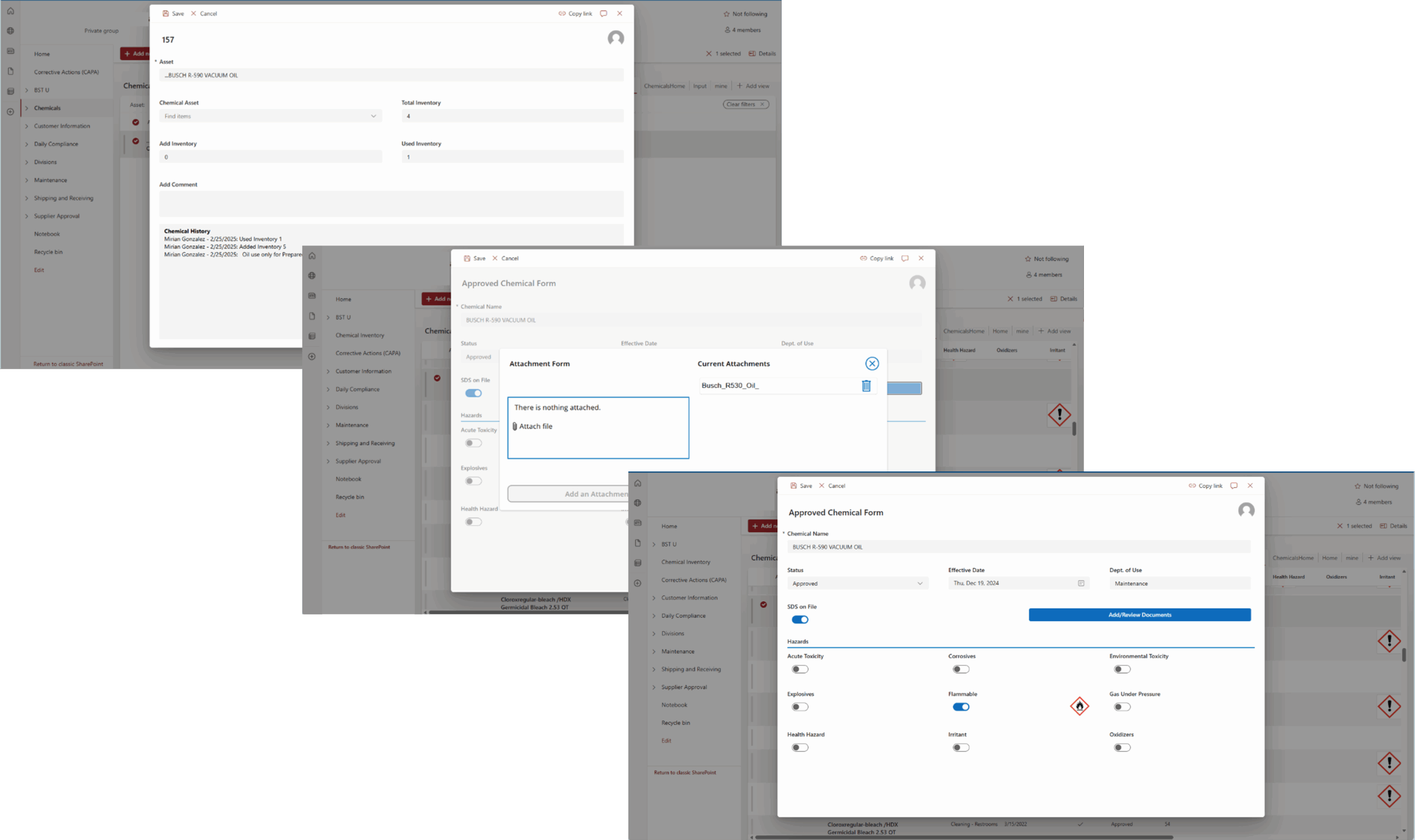
Chemical inventories are required for any organization using or managing hazardous chemicals in the workplace. They can be used to track inventory, communicate hazards, maintain Safety Data Sheets (SDS), and more. For companies using many chemicals, managing chemical quantities, historical usage, and associated documentation can be a challenge. KTL uses the Microsoft Power Platform to build and customize a Chemical Inventory Tool to replace scattered outdated systems, allowing organizations to more efficiently create inventories, track and manage chemicals, and meet regulatory compliance requirements.
Benefits: Why do you need it?
KTL’s Chemical Inventory Tool helps organizations using or managing chemicals to maintain compliance and streamline chemical management processes through:
- Managing Inventory: Maintains an accurate, up-to-date record of all chemicals onsite and their historical quantities.
- Centralizing Data Storage: Stores all chemical information in one location for easy access and consistency across sites.
- Communicating Hazards: Provides employees with quick access to chemical details, associated hazard information, and required personal protective equipment (PPE) for handling the chemical, reducing the risks of chemical handling and storage.
- Maintaining SDS: Connects chemical data to SDSs, helps ensure current versions are available, as required, and can store previous versions to meet the 30-year retention requirement.
- Streamlining Workflows: Creates workflows to manage chemical approvals, provide low supply reminders, and prompt regular chemical and SDS review.
- Reporting: Enables organizations to easily generate chemical inventories to comply with Tier III and Tier II reporting requirements and to provide to Local Emergency Planning Committees (LEPCs) and emergency response personnel.
Technology Used
- SharePoint or Dataverse
- Power Apps
- Power Automate

Information Management Solutions
Comments: No Comments
Tech Corner Q&A: Using the Software You Have
Having a simple, centralized compliance information management system to manage, track, communicate, and report compliance program information can enable staff to complete required tasks, improve compliance performance, and support operational decision-making. It sounds expensive, but it doesn’t have to be—not when most companies already have the software and just need the right combination of information technology (IT) and quality, food safety, and/or environmental, health, and safety (EHS) expertise to customize it.
We recently sat down with KTL’s Power Platform Team to talk about how organizations can leverage Microsoft 365 and the Power Platform to collect, track, report, and manage compliance; reduce risk; and improve operational efficiency.
Q: First, what is Microsoft 365 and the Power Platform?
Microsoft 365 is a suite of tools built to drive productivity across your organization. If you use Outlook or Office tools like Word, Excel, and SharePoint, then you are already using Microsoft 365. The Power Platform (i.e., Power Apps, Power Automate, Power BI) is an extension of Microsoft 365 that allows users to build and deploy custom business applications, workflows, and dashboards.
Q: Why Microsoft 365 and the Power Platform?
The Microsoft 365 and Power Platform suite of tools can be adapted and designed to manage documents and records, capture data, and provide program reporting to support and meet overall business and compliance needs. The best part? When developing Microsoft 365-based systems, we are not only leveraging software people are already familiar with, but we are also working with existing Microsoft licenses for development. Often, users also have existing licenses that allow them to use the developed systems. This helps keep budgets in check and fosters easy adoption and buy-in.
Q: What does the process look like?
No two projects are exactly alike. The process will vary a bit depending on your company’s current state and needs, but generally, most projects follow three phases:
- Planning: In many cases, companies know exactly what tools they want. In these cases, we meet with team members to get a solid understanding of needs and requirements and then build a scope that meets objectives. Sometimes, the needs aren’t as well defined. In these situations, we start by conducting an assessment to review current information management processes, practices, and tools; help the company set priorities; and develop a development plan that meets identified needs.
- Development, Review, and Rework: We take an iterative and collaborative approach to our development process that emphasizes customer input and feedback. This includes building out tools to a functional point and then requesting feedback to help ensure those tools meet requirements and deliver value.
- Turnover and Continued Support: Once development is complete, turnover is often as simple as setting a date for staff to start using and managing the tools. We conduct training that focuses on the basics of how to use the tools we develop. In addition, we offer continued support to make adjustments that may be needed once you start using the tools.
We help set priorities based on ease of implementation, compliance risk, business improvement, and value to your company. We often recommend starting with something simple—perhaps creating a document library or converting a paper checklist into an electronic form. We can work at your pace and budget to build and integrate only the modules you need one at a time or as a fully functional system. Our goal is to develop the system in a way that will work with your business and encourage buy-in, rather than you having to adapt your business to off-the-shelf software requirements and capabilities.
Q: From a technical standpoint, what will my IT department want to know if we already use Microsoft 365—or if we don’t?
If you already use Microsoft 365, you already have the accounts needed to use most systems KTL builds. Our developers just need access to your tenant to begin building. If you aren’t currently using Microsoft 365 or have not been using SharePoint, KTL will work with your IT department to set up the appropriate infrastructure for the systems we build. This typically involves selecting licensing, establishing a domain, and assigning licenses.
After access is established, our team can begin developing and piloting your system. Once users are comfortable with the applications, we hand the system over to you. The system and information are all yours. All applications run on Microsoft servers, and there are no external or proprietary software requirements. We train your staff to manage the system going forward, so minimal ongoing IT department support is needed.
Q: What are the benefits associated with creating Microsoft 365 system?
Microsoft 365 offers a unified and familiar platform that simplifies access and is adaptable to evolving data management and reporting needs. This allows you to maximize efficiency and connectivity between various operational and corporate groups without the added cost of separate tools. With Microsoft 365 you get:
- Smarter Data and Document Management: Replace paper systems, simplify data entry, and build flexible databases. Upload, organize, and retrieve records with ease.
- Streamlined Communication and Collaboration: Share information, send/receive notifications, and connect teams across departments, sites, and facilities.
- Compliance and Operational Oversight: Manage regulatory tasks, prepare for inspections, and assign role-based permissions to ensure accountability.
- Insightful Reporting and Continuous Improvement: Consolidate reporting, access real-time dashboards, monitor performance, and capture institutional knowledge for long-term sustainability.
Q: What makes KTL’s approach to information management different?
KTL is not a software company. Rather, we adapt Microsoft 365 and the Power Platform to your compliance needs. Our team is made up of EHS, quality, and food safety professionals with the technology expertise to design and build systems that allow you efficiently and effectively manage compliance and business processes. Because we understand regulatory, certification, and operational requirements, we are better able to make sure our technology solutions support your objectives.
Many companies look at software as a silver bullet—a fix for everything. But applying technology to operations isn’t about just finding and buying a software tool. It is about understanding business needs, then adapting and integrating the appropriate tool into existing operations. That means we start with the end user and build around that. If the system doesn’t work for the end user, then it’s not going to be used, no matter how fancy or how many bells and whistles it has.

Tech Corner: Contractor Safety Management Tool
Functionality: What does it do?
Many organizations rely on external contractors to help deliver products and services. However, using these contractors comes with inherent risks, especially when it comes to safety. Contractor safety management is vital in reducing operational risks, meeting regulatory requirements, and keeping contractors and employees safe. KTL’s Contractor Safety Management Tool supports multiple layers of compliance (e.g., site-level, contractor-level, and employee-level requirements) to help efficiently manage contractor safety requirements—from training, to document management, to proof of qualifications.
Benefits: Why do you need it?
A Contractor Safety Management Tool helps to streamline compliance by keeping all safety-related records in one web-based system, creating the following benefits:
- Maintains proof of qualifications and reduces associated risk by tracking expiration dates and sending reminders before certifications, insurance, or permits lapse (both at the company and individual levels).
- Improves operational safety by providing a centralized location for important safety documents and procedures, such as lockout/tagout (LOTO) procedures and access points.
- Simplifies audits and inspections by organizing safety records in a secure and easily accessible format.
- Efficiently tracks and manages pending, completed, and upcoming training and associated records to help ensure role-specific competency and demonstrate training compliance during audits.
- Increases transparency, enhances accountability, and promotes continual improvement regarding contractor safety performance.
- Maintains a consistent, structured process for completing contractor approvals, including sending notifications.
Technology Used
- SharePoint
- Power Apps (for custom forms)
- Power Automate (for email notifications)
Tech Corner: Safety Document Management System
Functionality: What does it do?
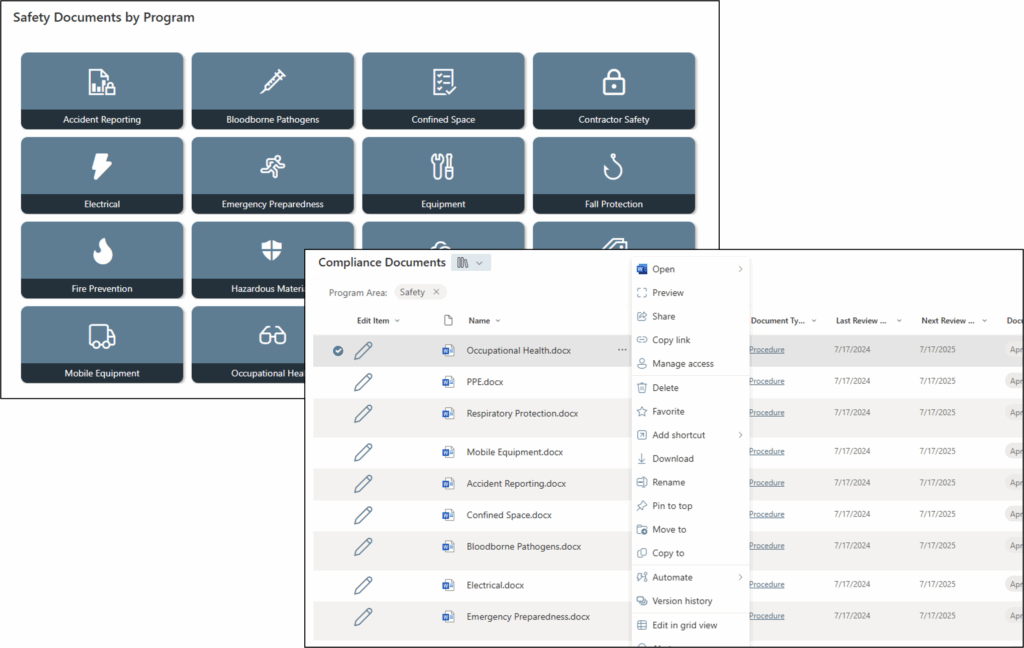
A Safety Document Management System provides a company-wide framework for central, secure storage and organization of safety-related documents and records. This includes policies, procedures, training records, inspection reports, and regulatory documentation to comply with Occupational Safety and Health Administration (OSHA) requirements.
Safety records often have strict retention and security requirements and must be accessible for an audit at any time. A structured Safety Document Management System can help ensure that these critical files are not only retained according to OSHA requirements, but also are standardized, easily searchable, and available to the right people when they need them.
Benefits: Why do you need it?
Implementing a Microsoft SharePoint-based Safety Document Management System provides the following:
- Centralized access to safety policies, procedures, checklists, inspection logs, and training records – whether onsite or remote.
- Document version control to promote consistency and reduce errors associated with outdated versions being used.
- Quick document retrieval, version history, and clear audit trails to demonstrate compliance during audits.
- Improved operational collaboration through real-time share, review, and update capabilities.
- Enhanced workflows configured for notifications, document retention/archive processes, and document approvals (e.g., new procedures, corrective actions) with clear accountability.
- Increased visibility into safety performance by linking documents with incident reports, risk assessments, and corrective and preventive actions (CAPAs).
- Ease in uploading documents (like a shared network drive) and adding/updating metadata to improve searchability.
- Reduced physical paperwork.
- Option to include digital signatures on required documents.
- Better security and access permissions/control to protect sensitive safety data (e.g., incident investigations or medical information).
Together, these capabilities lead to safer workplaces, stronger compliance performance, and reduced risk during audits or inspections.
Technology Used
- SharePoint
- Power Automate

Information Management Solutions
Comments: No Comments
Tech Corner: Incident Management Tool
Functionality: What does it do?
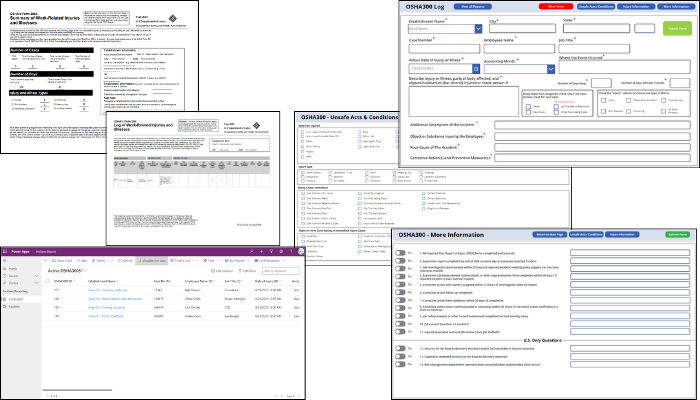
Every organization is at risk of incidents, those unplanned events that have the potential to disrupt service and cause significant operational impacts—safety, environmental, food safety, quality, reputational, etc. KTL’s Incident Management Tool provides organizations with an effective system to help manage workplace incidents, track patterns, identify trends, and correct unsafe practices to maintain compliance and prevent future issues.
Benefits: Why do you need it?
Built on Microsoft’s Power Platform, KTL’s Incident Management Tool:
- Allows for easy and secure data entry from any device, anytime, anywhere with mobile access.
- Tracks all types of incidents in one system, providing centralized incident data management, trending, and analysis.
- Connects to KTL’s Root Cause Analysis Tool and Corrective and Preventive Action (CAPA) Tracking Log to enhance incident investigations, identify root causes, and track and manage CAPAs to closure.
- Implements workflows to manage incidents, including sending email notifications, routing documents, processing forms, etc.
- Generates customized dashboards that provide visual displays of incident data to help identify opportunities to prevent future incidents.
- Improves compliance by organizing data for reporting to OSHA, EPA, or other regulatory agencies.
- Allows response teams to document and share information as events unfold—from initial emergency response protocols through crisis management steps—so proper decisions can be made and documented for business continuity.
Technology Used
- Power Apps
- Microsoft Dataverse
- Power Automate
- Power BI
Information Management Solutions
Comments: No Comments
Tech Corner: Root Cause Analysis Tool
Functionality: What does it do?
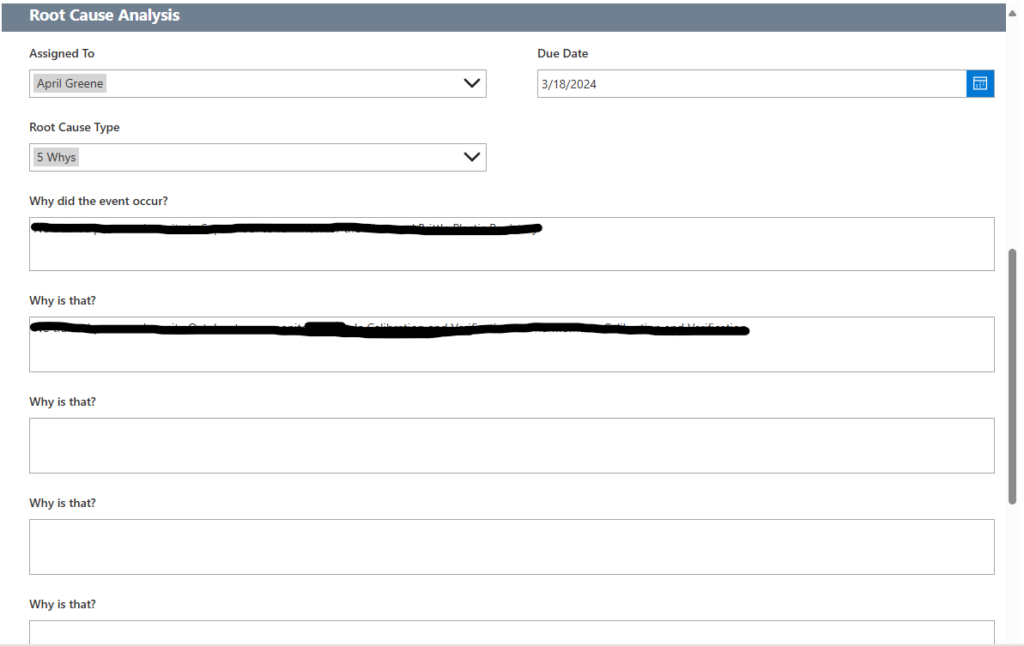
Root cause analysis (RCA) is a systematic method of problem-solving used to identify the underlying (i.e., root) cause(s) of a problem or incident, alleviate risk, and help ensure that similar problems do not occur in the future. KTL’s RCA Tool walks users through the 5-Why Process, a simple method for conducting an RCA that involves asking the question “Why” enough times (i.e., five times) to get past the symptoms of a problem and down to the underlying root cause of the issue.
Benefits: Why do you need it?
KTL’s RCA Tool ties directly to corrective and preventive actions (CAPAs) to help ensure an RCA is conducted, as needed, for each CAPA. The tool sends a notification to supervisor/management when a CAPA is submitted with a direct link to the CAPA so management can complete the RCA, assigns follow-up actions and sends notifications to the responsible person(s), and keeps records in a central location for audits, regulatory visits, or future data analysis.
Using the RCA Tool offers a simple way to conduct an effective RCA that can help organizations to:
- Reduce the risk of injury and/or death to workers and community members.
- Avoid unnecessary costs resulting from business interruption; emergency response and cleanup; increased regulation, audits, and inspections; and OSHA fines.
- More effectively control hazards, improve process reliability, increase revenues, decrease production costs, lower maintenance costs, and lower insurance premiums.
Technology Used
- SharePoint for data storage
- Power Apps for the user interface
- Power Automate to send notifications

Information Management Solutions
Comments: No Comments
Tech Corner: Using SharePoint as a Management Tool
Functionality: What does it do?
Having a simple, centralized system to manage, track, communicate, and report compliance program information can enable staff to complete required tasks, improve compliance performance, and support operational decision-making. Microsoft SharePoint® provides a powerful platform that helps organizations manage, share, and collaborate on documents and information to create operational efficiencies.
Implementing a system like this may seem overwhelming. One of the most difficult aspects can simply be determining how to get started. Starting small—with a single team or department—is often the best approach. Focusing on core SharePoint features, such as document management and lists, provides users with an easy to grasp introduction to the system. As comfort grows, SharePoint can then be expanded to support broader business processes and integrations with other Microsoft Power Platform® tools.
Benefits: Why do you need it?
SharePoint provides a simple, centralized solution for managing everyday business tasks using familiar technology. The platform gives users the opportunity to start small and build additional functionality and business efficiencies. For example:
- Document management in SharePoint allows businesses to store, organize, and collaborate on files in a secure and centralized environment.
- Lists function like spreadsheets or lightweight databases, ideal for tracking information, managing tasks, or logging activities.
Both of these features are “out of the box” functionalities of SharePoint that are easy to deploy and use, while delivering significant impacts to business efficiency and better control over business documents and data.
Technology Used
- SharePoint Site/Pages
- Document Libraries and Lists