
Comments: No Comments
Safe & Sound Week 2026: Management Leadership
Management leadership is the foundation of an effective safety and health program, one of the defining characteristics of a strong safety culture, and one of the three core elements of OSHA’s Safe & Sound framework for creating a sustainable safety and health program.
What Does Management Leadership Mean
OSHA defines management leadership as it relates to safety as a commitment from the top to implement a safety and health program and use it to drive continuous improvement. Best-in-class safety cultures have mature, well-functioning systems that integrate leadership and employee engagement into standard operating practices. When leadership commitment is sincere and supported by visible action, workers understand that safety and health are not side priorities; they are core to business success.
Strong leadership turns safety from a compliance obligation into a shared operational value. It gives the safety and health program direction, provides the resources needed to make progress, and sets expectations for managers, supervisors, and workers. Just as important, it demonstrates care. Effective safety leaders show workers that their well-being matters, concerns will be heard, and safety decisions will be backed by action. Without leadership commitment, even well-designed programs can become inconsistent, underfunded, or disconnected from daily work.
Make Safety a Core Organizational Value
Management leadership starts with making worker safety and health a core organizational value. This includes developing a clear policy statement signed by top management and communicated across the organization. The message should be simple and direct: Protecting workers is as important as productivity, quality, profitability, customer satisfaction, and other business priorities.
Safety and health should be integrated into planning, budgeting, purchasing, contractor selection, facility design, staffing, scheduling, and operational changes. When leaders consistently consider risk before work begins, safety becomes part of how the organization operates, not a separate activity reviewed only after an incident.
Define Goals and Assign Accountability
Specific program goals are important, so everyone understands what the organization is working to improve. These goals should focus on prevention-oriented actions, not just injury or illness rates. Examples include completing hazard assessments, closing corrective actions on time, increasing near-miss reporting, improving training completion, reducing exposure risks, or strengthening emergency preparedness.
Goals are only effective when they are supported by clear ownership. Leaders should assign responsibilities, establish timeframes, provide authority to act, and review progress regularly. Managers and supervisors should be expected to integrate safety into everyday work planning, and workers should be encouraged to report concerns and participate in solutions without fear of retaliation.
Communicating Commitment through Visible Action
Safety leadership must be demonstrated through day-to-day behaviors. Effective safety leaders are visible, credible, consistent, and engaged. They care about people, communicate clearly, listen actively, make informed decisions, and reinforce expectations through their own actions. They also recognize that culture is shaped by what leaders tolerate, prioritize, fund, measure, and reward.
Visibility matters. Executives, managers, and supervisors should be present in operations, ask questions, listen to workers, participate in safety walk-arounds, and model the same safe behaviors they expect from others. Leadership credibility depends on consistency; workers notice whether leaders follow procedures, use required protective equipment, correct hazards, and respond constructively when safety concerns are raised.
Allocate the Resources Needed to Succeed
Organizations need to provide the people, time, training, equipment, tools, technology, and budget needed to implement and maintain the safety and health program. That includes giving workers time to participate in inspections, training, incident reviews, safety meetings, and improvement activities. It also means ensuring corrective actions are funded and completed, hazards are controlled, and supervisors have the support and resources needed to manage safety performance effectively.
Recognize Contributions and Expect Performance
Effective safety leaders also create the conditions for employee engagement. They invite input, encourage reporting, and make it clear that workers have an active role in identifying hazards and improving controls. This matters, because the people closest to the work often have the best understanding of what can go wrong and what practical solutions will work.
Leaders can reinforce positive safety behaviors by recognizing workers and teams that identify hazards, contribute ideas, complete corrective actions, mentor others, or support emergency readiness. Recognition should be tied to meaningful actions that prevent harm, not simply low injury rates.
At the same time, leaders must expect performance. Safety responsibilities should be built into roles, job expectations, contractor requirements, and performance discussions. Managers and supervisors should be held accountable for supporting the program, addressing hazards, communicating expectations, and following through on commitments. Leaders should reinforce expectations by opening meetings with safety and health updates, reviewing outstanding action items, discussing trends and leading indicators, and following up on concerns raised by workers.
Practical Actions for Management Leaders
- Develop or refresh a written safety and health policy signed by top management.
- Communicate safety expectations to workers, contractors, staffing agencies, vendors, and visitors.
- Begin leadership meetings with safety and health updates, open action items, and leading indicators.
- Participate in safety walk-arounds, hazard reviews, and worker discussions.
- Listen to worker concerns, encourage reporting, and respond without blame or retaliation.
- Set realistic, measurable goals focused on hazard prevention and continuous improvement.
- Assign responsibilities, deadlines, and resources for program activities and corrective actions.
- Integrate safety and health into planning, budgeting, procurement, staffing, and operational decisions.
- Recognize workers and teams for proactive safety contributions.
- Model safe behaviors and follow the same procedures expected of workers.
Leadership Sets the Standard
A robust safety and health program depends on leadership that is visible, consistent, engaged, and accountable. When leaders communicate that safety matters, provide the resources to act, listen to workers, recognize meaningful contributions, and make safety part of everyday decisions, they create the conditions for hazards to be found and fixed before they cause harm. Management leadership gives the safety and health program the authority, momentum, and credibility it needs to succeed, and it helps build the safety culture needed to sustain results over time.

KTL to Present on Information Management and Safety Culture
KTL will be a featured presenter and exhibitor at the 2026 Chicagoland Safety, Health & Environmental Conference in Naperville, Illinois, September 14-16, 2026. The Conference provides timely and relevant environmental management, safety, health, professional development and OSHA/EPA compliance training to EHS professionals, business owners, facility managers, plant managers, supervisors, safety committee members, human resources managers, municipalities, and others who have safety, health, and environmental management and compliance responsibilities.
KTL Sessions
Session T05: EHS Data Management: A DIY Approach | Tuesday, September 15, 8:30-10:00 am CT
Building an EHS compliance management system doesn’t have to be complicated or expensive—not when most companies already have the software they need. Learn how to build data management tools to collect, track, and report EHS compliance information using the latest Microsoft 365 and Power Platform apps. This session will walk through key features and functionality of an EHS compliance management system, discuss the importance of a plan-do-check-act development approach, and provide tips to ensure successful development and implementation. See working examples and hear directly from EHS and IT experts on how to leverage familiar Microsoft tools to cost-effectively elevate EHS processes and management systems and drive ongoing compliance.
Session W18: Framework for Creating a Best-in-Class Safety Culture | Wednesday, September 16, 1:15-2:45 pm CT
High-profile incidents in industries from energy to manufacturing demonstrate that safety compliance alone is not enough—organizational culture determines whether safety systems thrive or fail. Consistent with OSHA’s Recommended Practices for Safety and Health Programs and ISO 45001, this session outlines a practical framework for building a best-in-class safety culture focused on ten key attributes: leadership, values, goals and initiatives, organization and structure, employee engagement, resource allocation, systems and standards, metrics and reporting, continual learning, and verification and auditing. This presentation will help professionals create a Safety Culture Action Plan that moves the organization beyond short-term initiatives toward sustainable cultural excellence through proven implementation techniques. Participants will gain actionable insights to strengthen their own safety cultures, improve safety outcomes, reduce incidents, and create organizational resilience.
Stop by KTL’s booth (#101) to talk more about your safety, health, and environmental needs. We look forward to connecting with you in Naperville!
Comments: No Comments
Safe & Sound Week 2026: Recognizing Health & Safety Achievements
The Occupational Safety and Health Administration’s (OSHA) annual Safe & Sound Week campaign is built on a simple principle: Safe workplaces are sound businesses. Held August 10–16, 2026, this nationwide event recognizes the value of workplace safety and health programs and encourages organizations of all sizes and industries to take visible steps to protect workers, strengthen safety culture, and improve business performance.
Why Participation Matters
Safety and health programs help organizations move beyond reactive compliance toward proactive risk management. By identifying and controlling hazards before they cause harm, employers can reduce injuries and illnesses, improve compliance, lower costs, strengthen employee engagement, support business continuity, and improve overall operations. Whether an organization is launching a new program or strengthening a mature one, Safe & Sound Week offers a timely opportunity to focus attention, recognize progress, and reinforce year-round commitment.
Participating in Safe & Sound Week can help organizations start a safety and health program, energize an existing program, or highlight year-round accomplishments. There are many ways to get involved:
- Register your organization’s participation through OSHA’s Safe & Sound Week site.
- Recognize workers, teams, or departments that have contributed to safer work practices.
- Create a safety wall of fame or issue safety shoutouts to highlight positive safety actions.
- Hold a safety meeting, toolbox talk, quiz, inspection, emergency drill, or hazard identification challenge.
- Review recent incidents, near misses, hazard reports, or inspection findings and identify corrective actions.
- Set measurable safety and health goals for the remainder of the year.
- Share participation internally through newsletters, posters, digital signage, or team meetings using #SafeAndSoundAtWork.
Core Elements of a Strong Safety and Health Program
OSHA’s Safe & Sound framework centers on three core elements that work together to create a sustainable safety and health program. Throughout OSHA’s Safe & Sound Week, KTL will be featuring a series of articles and posts on our blog and social media (i.e., Facebook, LinkedIn, X) focused on how you can integrate these elements to elevate your safety and health efforts:
- Management leadership. Leaders provide the vision, resources, accountability, and visible commitment needed to make safety and health part of how work gets done.
- Worker participation. Workers bring firsthand knowledge of tasks, hazards, and practical controls. Meaningful participation helps uncover risks, improve solutions, and build ownership.
- Find-and-fix hazards. A systematic process for identifying, evaluating, and controlling hazards helps organizations prevent injuries and illnesses instead of responding only after incidents occur.
Make It More Than a Week
Safe & Sound Week is most valuable when it becomes a catalyst for continuous improvement. Recognition should point back to the systems, behaviors, and controls that prevent harm: leadership commitment, worker involvement, and proactive hazard management. Join KTL this Safe & Sound Week to celebrate progress, identify gaps, and recommit to building a safer, healthier, and more resilient workplace.

Comments: No Comments
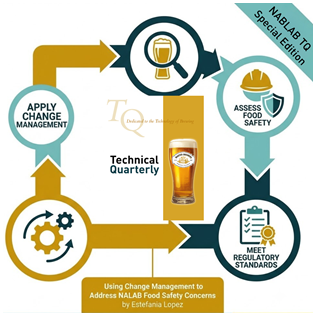
Using Change Management to Address NALAB Food Safety Concerns
Navigating the transition into non-alcoholic brewing requires more than traditional product development. KTL’s recent article in the Master Brewer Association of the Americas (MBAA) Technical Quarterly outlines how breweries can leverage structured change management to address regulatory requirements and food safety risks when adding non-alcoholic and low-alcoholic beverage (NALAB) products. This article breaks down the essential regulatory standards, critical food safety risks, and change management strategies needed to successfully bring NALAB products to market securely. Read KTL’s MBAA Technical Quarterly article.
2026 Master Brewers Conference Poster Presentation: Highlighting NALAB Food Safety Concerns
KTL is also co-presenting a poster session with New Belgium Brewing Company on Food Safety and Regulatory Implications of Producing Nonalcoholic and Low-Alcohol Beer (NALAB) at the 2026 Master Brewers Conference in Virginia Beach, Virginia, October 22-24, 2026. In this poster presentation, the following experts from New Belgium Brewing Company and KTL explore the practical realities of integrating NALAB production into an existing brewing operation.
Maddy Frierson, Quality Scientist | mfrierson@newbelgium.com
New Belgium Brewing Company
Maddy is a food safety professional with three years of experience spanning academic research and industry application, including work in the microbiological safety of non-alcoholic beer and food safety program management in brewing operations. Her graduate research focused on evaluating the impact of pasteurization on pathogens in non-alcoholic beer and the impact of spoilage organisms on pathogen survival and growth in non-alcoholic beer products. At New Belgium Brewing Company’s Daleville, Virginia facility, Maddy works as a member of the food safety team, where she maintains and implements the site’s food safety management system to ensure compliance with GFSI certification requirements. She has also supported change management efforts associated with the site’s non-alcoholic beer production program, helping facilitate the integration of food safety principles into new processes and products. Maddy is passionate about food safety and the implementation of effective food safety management systems that protect consumers and support operational excellence.
Samantha Humphrey, Associate | shumphrey@goktl.com
KTL
Sam is a food safety and quality assurance (FSQA) professional with ten years of experience supporting the food and beverage industry. She has specialized expertise in food safety regulatory interpretation and compliance, particularly related to Good Manufacturing Practices (GMPs), Good Brewing Practices (GBPs), and Good Agricultural Practices (GAPs); GFSI certification; supply chain management; environmental monitoring and sanitation; and food microbiology. In the past few years, Sam has worked alongside several brewers, including New Belgium Brewing Company, to help build and implement GFSI-compliant food safety management systems that lead to certification. She is passionate about supporting the industry and providing best practice guidance as it pertains to mitigating food (beer) safety risk. Sam is a Certified ATD Master Trainer, Certified Professional – Food Safety (CP-FS), Preventive Controls Qualified Individual (PCQI) Lead Instructor, and Produce Safety Rule Lead Trainer, and is Juice and Seafood HACCP certified.

Comments: No Comments
KTL Joins WI Green Tier Panel on ISO 14001:2026
KTL is joining Wisconsin Department of Natural Resources (WDNR) Green Tier Program for a webinar on the recent changes to ISO 14001 and its implications for your environmental management system (EMS) on Tuesday, August 25 from 12:00-1:00 PM. Click here to register!
This webinar will focus on updates to the ISO 14001 standard, including:
- How to maintain conformance through your EMS.
- Expanded review of environmental conditions that impact or are impacted by your organization.
- Greater emphasis on lifecycle perspective when identifying aspects.
- New clause on managing change.
- Broader role for leadership.
- Updates to managing third-party provided processes and services.
- Alignment with Green Tier Functionally Equivalent EMS elements.
Guest speakers will include Green Tier auditors and DNR staff, who will share how the updates align with Green Tier’s Functionally Equivalent EMS and ‘superior environmental performance’ outcomes defined in law. Expert panelists include:
- April Greene, CSP, CHMM, KTL
- Douglas B. Johnson, Ph.D., KeenWorks LLC
- Kevin Lehner, Environmental Compliance Systems, Inc
- John Senter, The SenterStone Companies
- Jenni Birkholz, Green Tier Project Coordinator, WI DNR
- Weston Wegener, Green Tier Project Coordinator, WI DNR

Comments: No Comments
KTL Talks Safety Culture at the VPPPA 2026 Safety+ Symposium
KTL will be a featured presenter at VPPPA’s 2026 Safety+ Symposium in Nashville, Tennessee, August 30-September 2, 2026. The Safety+ Symposium is a premiere EHS&S event that provides the tools and resources to bring safety and health programs beyond compliance to excellence. It offers attendees the unique opportunity to see safety from all angles and better understand its role in the modern workplace. Designed with continuous improvement at its core, VPPPA’s Safety+ Symposium enables workers from all industries, at all levels, to better themselves as well as their workplace.
KTL will be presenting a breakout session on September 1 at 7:00 a.m. entitled Framework for Creating a Best-in-Class Safety Culture. Improving safety culture is one of the most urgent challenges facing organizations today. High-profile incidents in industries from energy to manufacturing demonstrate that compliance alone is not enough—organizational culture determines whether safety systems thrive or fail. Creating an effective Safety Culture Action Plan requires considering existing culture and honestly assessing which changes are reasonable to implement first. This session provides a tested framework, based on research and field experience, that enables professionals to recognize the building blocks of a world-class safety culture. KTL will discuss real-world practices, leadership behaviors, and organizational strategies that can elevate safety culture from good to truly best-in-class.
We look forward to connecting with you in Nashville!

KTL to Co-Present on Hazardous Materials Management at CUHMMC
KTL will be attending at the 2026 College & University Hazardous Materials Management Conference (CUHMMC) at the University of Minnesota – Twin Cities August 9-12, 2026. CUHMMC is the premier higher education hazmat conference, bringing together the EHS leaders from across higher education to discuss the challenges faced in an academic environment and solutions and best practices that have been implemented at peer institutions.
KTL will be co-presenting with Southeast Missouri State University (SEMO) on Using Microsoft SharePoint and the Power Platform for Hazardous Materials Management. This presentation will discuss how educational facilities can use Microsoft SharePoint and the Power Platform to develop hazardous materials data management tools. We will provide an overview of how the Microsoft platform can be used to address university-specific needs and will demonstrate tools such as a chemical inventory app, waste determination register, waste pick-up workflow, and a training management system.
We look forward to connecting with you in Minneapolis!
Comments: No Comments
Managing Food Safety Risks in Warehouse and Distribution Centers
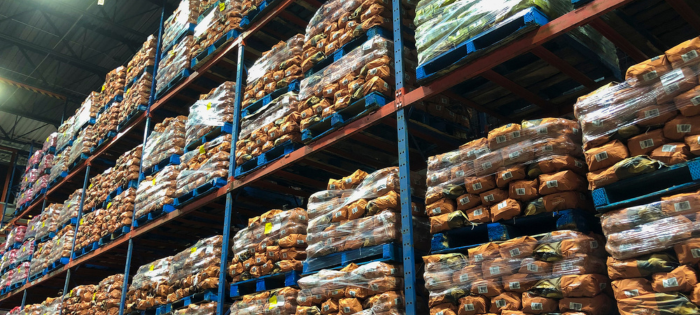
Recent recalls tied to contaminated warehouse conditions show how quickly an outside storage or distribution failure can become a brand, consumer safety, and regulatory problem for any company whose products pass through that facility. Food safety and quality are not limited to food manufacturers. When a third-party logistics (3PL) provider, outside warehouse, wholesaler, or distribution center (DC) stores regulated products under unsanitary conditions, otherwise compliant products can become adulterated after they leave the manufacturer’s control.
The reality is that once products enter an outside warehouse, the product manufacturer still owns the consequences of how their products are stored, protected, and traced, which is why managing 3PLs, warehouses, and DCs like any other supplier is so important.
Why It Matters
Many companies treat warehousing and distribution as downstream logistics functions rather than as critical control points in the food safety supply chain system. But there are clear ramifications from doing so. Storage, handling, pest control, sanitation, segregation, temperature control, inventory rotation, and traceability can materially affect product safety and quality. A product that was manufactured safely can still become contaminated, damaged, misidentified, or rendered unsuitable for sale during storage or distribution.
Outsourcing logistics does not remove responsibility. Brand owners, manufacturers, importers, distributors, and retailers may still face recall costs, customer claims, regulatory scrutiny, reputational harm, and business interruption if a third-party facility fails. Many consumers and customers will associate a third-party facility recall with the product brand, not the warehouse or DC where the failure occurred.
Key Risks Created by Outside Warehouse and Distribution Suppliers
Outside warehouses and DCs can introduce risk in several ways. The most prevalent is exposure to unsanitary conditions from pests, standing water, damaged packaging, poor housekeeping, inadequate waste management, or commingled storage. However, the risk profile is broader than sanitation alone and can include the following:
- Inadequate product traceability or lot-level visibility.
- Weak recall support or slow access to records.
- Inadequate temperature control and missing or incomplete temperature records.
- Improper segregation of allergens, chemicals, or incompatible products.
- Expired inventory, undocumented rework, or relabeling activity.
- Poor contractor oversight and insufficient facility security controls.
The highest risk facilities tend to be those that handle mixed-product categories, high-inventory turnover, small-lot distribution, damaged or returned goods, and products from many unrelated manufacturers. In these environments, one sanitation failure can affect hundreds (or even thousands) of SKUs and create a complex recall that requires coordination across multiple brands, retailers, regulators, and consumers.
Material and Measurable Impacts
Like any recall event, the consequences associated with a contaminated warehouse event may be significant for the warehouse, but also for the brand owner and product manufacturer. A recall can trigger product holds, expanded traceability exercises, customer notifications, disposal costs, refund obligations, transportation expenses, legal review, insurance claims, and lost sales. It can also expose gaps in supplier approval programs, recall plans, and crisis communication procedures. If the company cannot quickly determine which lots were stored where, when, and under what conditions, the scope and potential impacts of the recall may quickly expand.
Key Controls for Reducing Recall Risk
Companies using 3PLs and outside storage and distribution suppliers need to employ active oversight; a simple, signed service agreement is not enough. The strongest programs qualify storage and distribution providers before use, define expectations in writing, verify controls onsite, monitor performance continuously, test recall readiness, escalate early, document decisions, and requalify when risk changes—just as they would any other supplier.
The following actions can help to reduce recall risks and create a robust program to maintain warehouse compliance:
- Treat warehouses and 3PLs as critical suppliers. Include outside warehouses, DCs, fulfillment centers, and cross-dock operations in a formal Supplier Approval Program. Risk-rank them based on product type, storage conditions, regulatory category, geography, history, volume, and whether they handle mixed-product categories.
- Conduct structured due diligence and onsite audits. Before onboarding a 3PL, evaluate regulatory status, inspection history, certifications, insurance coverage, facility conditions, sanitation and pest management records, temperature-control capabilities, recall history, subcontractor use, and ability to support lot-level traceability. Audits should verify conditions directly; desk reviews are not enough.
- Require documented pest prevention and sanitation controls. Service agreements should require pest control maps, service records, trend reports, sanitation schedules, inspection logs, corrective actions, and evidence that findings are investigated and closed. Recurring pest activity, unexplained droppings, damaged doors, open dock gaps, or poor housekeeping should trigger escalation.
- Strengthen traceability and lot-level visibility. Manufacturers need to know which products, lots, and dates were stored at each facility. Ensure warehouse management systems support rapid retrieval of receiving, storage, movement, shipping, hold, and destruction records. If the affected lots cannot be isolated quickly, recall scope and cost will increase.
- Build recall obligations into supplier agreements. Agreements should define notification timelines, record access, product hold authority, communication responsibilities, destruction documentation, refund or recovery provisions, and cooperation with regulators. Companies should test these requirements through mock recalls involving the 3PL or warehouse supplier.
- Monitor performance continuously. Regular supplier oversight should include audit performance, corrective action closure time, pest activity trends, sanitation findings, temperature deviations, damaged goods rates, inventory accuracy, customer complaints, shipping errors, product hold events, regulatory findings, and mock recall completion time. These indicators should drive supplier risk ratings, audit frequency, and escalation requirements.
- Re-evaluate suppliers and maintain alternatives. Reassess 3PLs annually and when they add facilities, change ownership, expand product categories, increase volume, add subcontractors, receive regulatory findings, or experience contamination, temperature, traceability, or security incidents. Prequalifying backup suppliers can help support faster recovery if a logistics partner fails.
Key Takeaways
Warehouse and distribution controls are product safety controls. Outsourcing logistics does not outsource responsibility for product safety, traceability, or recall readiness. One sanitation failure at a multi-brand warehouse can create a complex, expensive, and highly visible recall. As such, brand owners need to manage 3PLs with the same discipline applied to manufacturers, ingredient suppliers, and other critical suppliers. The most effective programs are proactive, documented, risk-based, and supported by evidence to remove recall risk before it becomes a liability.

Environment / Food Safety / Information Management Solutions / Quality / Safety
Comments: No Comments
Tech Corner: Electronic Standards Register
Functionality: What does it do?
Certification standards help assure customers, suppliers, regulators, and stakeholders that an organization’s products, services, and management systems meet recognized best practices. These standards are not static. Requirements continue to evolve as certification bodies respond to new risks, regulatory expectations, sustainability priorities, technology changes, and global benchmarking requirements. These updates can quickly create gaps if requirements are tracked manually or inconsistently, especially for companies certified to more than one overlapping scheme.
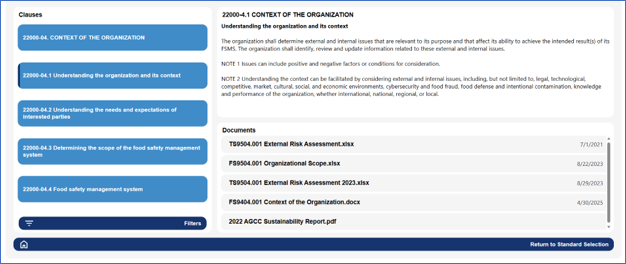
Recent and upcoming updates to SQF, FSSC 22000, ISO 14001, ISO 9001, and other ISO-based management system standards make it increasingly important for organizations to maintain a structured, current view of the requirements that apply to them. KTL’s electronic standards register organizes certification requirements into an online tool, allowing teams to track applicable clauses, map supporting documents, assign responsibilities, and monitor version changes across multiple standards.
Benefits: Why do you need it?
KTL’s electronic standards register is more than a document management tool. It provides the framework for monitoring change, assigning ownership, documenting implementation, and demonstrating that the organization has evaluated and responded to new or revised requirements in a timely, controlled manner. This is especially valuable during standards transitions to ensure the organization is complying with the most recent version.
An electronic standards register:
- Maps the organization’s documents to specific certification standard requirements.
- Identifies common requirements and allows documentation to be linked between standards, as needed.
- Maintains version control by tracking the current standard, upcoming revisions, transition deadlines, and changes that may affect procedures, records, training, and audit evidence.
- Supports proactive gap assessments when standards are revised, helping teams identify where policies, programs, forms, and responsibilities need to be updated before certification audits.
- Reduces the risk of missed updates when an organization manages multiple certification schemes, sites, departments, or document owners.
- Helps the internal audit team to complete and keep notes for the internal audit.
- Supports management review, internal audit planning, corrective action tracking, and communication across functions.
Technology Used
- Power Apps
- SharePoint

Comments: No Comments
Turning Warehouse Safety Inspection Risk into Operational Readiness
Warehouse and distribution center (DC) operations have fallen under increased scrutiny from the Occupational Safety and Health Administration (OSHA) due to their workplace hazards and associated injury and illness rates. In fact, the Bureau of Labor Statistics’ (BLS) history shows that injury and illness rates for these establishments are significantly higher than for other establishments. In response, OSHA established the National Emphasis Program (NEP) on Warehousing and DC Operations to implement comprehensive safety inspections focused on common hazards in warehouses and DCs.
Why the NEP Matters Now
Warehouses and DCs are complex, fast-moving environments where injury risk can quickly grow due to routine operating pressures. The NEP is OSHA’s response to these persistent risks. It directs enforcement attention toward the hazards that most often drive serious injuries. Core NEP focus areas include:
- Powered industrial vehicle operations (e.g., forklift traffic, pedestrian exposure, charging areas, and operator practices).
- Material handling and storage (e.g., rack condition, load stability, stacking, pallet condition, and congestion).
- Walking-working surfaces (e.g., slips, trips, falls, dock edges, floor conditions, and aisle obstructions).
- Means of egress and fire protection (e.g., blocked exits, emergency access, extinguishers, alarms, and storage near electrical or fire systems).
- Heat and ergonomic hazards.
The NEP is more than an enforcement directive; it is a practical planning tool that gives employers a preview of what inspectors are likely to evaluate. For warehouse leaders, this presents an opportunity to use OSHA’s inspection priorities to improve how safety is managed across people, equipment, workflows, and documentation. It further gives operators a roadmap to identify weaknesses before they become citations, reduce high-injury trends, strengthen compliance systems, and adequately prepare for inspections.
Start with the Hazards OSHA Is Prioritizing
Effective readiness starts by viewing the facility the way an OSHA compliance officer will. OSHA is not only looking for isolated hazards; it is looking for patterns that show whether safety controls are working consistently across the operation. That means evaluating physical conditions, work practices, employee understanding, and injury history together, not as separate compliance exercises. A clean checklist is not enough if the operation cannot demonstrate consistent operational control of workplace hazards.
Facility teams usually recognize obvious hazards, but the real risk is often in small hazards that become routine (e.g., recurring aisle obstructions, routine pedestrian-forklift conflicts, repeated rack damage, high-turnover training gaps, or workarounds that become accepted practice). These patterns are exactly the red flags that garner increased OSHA attention during an inspection.
The Difference Between Prepared and Inspection-Ready
Many operations feel prepared for an OSHA inspection because they have programs, records, and training in place. Inspection readiness requires more. The difference comes down to consistency vs. intention, documentation vs. verification, and awareness vs. execution. Warehouses that perform well during inspections typically know their risks, validate their systems regularly, train employees beyond minimum requirements, and treat safety as an operational priority.
A structured, OSHA-style readiness review that focuses on the following can help leaders see the operation through an inspection lens before OSHA does.
Confirm training is working in practice. Employees should receive regular training in forklift operations, hazard communication, lockout/tagout (LOTO) procedures, and emergency response actions. But training completion alone does not prove readiness. OSHA evaluates whether employees understand procedures and apply them consistently under real operating conditions. If employees across shifts/departments give uncertain or conflicting answers, inspectors may question whether procedures are understood, implemented, and reinforced.
Look closely at equipment, storage, and maintenance. Visible physical hazards can quickly shape the direction of an OSHA walkthrough. Damaged racks, poor housekeeping, blocked access, undocumented forklift inspections, and inconsistent preventive maintenance can signal broader management weaknesses. Equipment deficiencies are often among the fastest ways for an inspection to escalate. The concern is whether the facility has a reliable system for identifying, correcting, and preventing repeat conditions.
Make documentation available and inspection ready. Documentation is more than a recordkeeping requirement; it is evidence of how the safety system functions. Documentation includes not just following OSHA requirements but also what is dictated in internal policies and procedures. Often documents exist but are incomplete, inconsistent, outdated, or disconnected from what is happening on the floor. Conduct regular documentation audits and pressure-test critical records before an inspection to ensure OSHA 300/300A/301 logs, safety training records, equipment inspection logs, written safety programs (e.g., LOTO, PPE, Emergency Action Plan), and safety data sheets (SDS) not only exist, but that controls are implemented, verified, and corrected when they fail.
Build readiness into daily operations. Strong OSHA readiness depends on operational discipline. Supervisors must reinforce expectations, employees must know how to report hazards, and leadership must treat safety performance as part of how work gets done. Once again, inconsistency is a warning sign. How the organization responds to corrective actions (i.e., priority, urgency, timeliness) also shows OSHA how seriously the company takes safety. If practices vary significantly by shift, supervisor, department, or workload—or if corrective actions aren’t appropriately prioritized and addressed—OSHA may view that as evidence that the safety system is not being managed effectively.
Strengthening OSHA Readiness
OSHA readiness is not achieved through a binder, checklist, or one-time walkthrough. It is built through disciplined execution, clear accountability, and consistent oversight. Comparing OSHA’s inspection priorities against actual operating conditions can help move warehouses and DCs from general compliance review to targeted risk reduction:
- Compare OSHA 300, 300A, and 301 records against NEP hazard categories to identify and correct injury patterns.
- Walk the facility by process flow (i.e., receiving, put-away, picking, packing, shipping, returns, maintenance, and charging areas) rather than by department alone.
- Verify that high-frequency tasks have effective controls for struck-by, caught-in-between, fall, ergonomic, and heat exposures.
- Interview employees and supervisors using inspection-style questions to confirm procedures are understood and followed consistently.
- Review corrective actions to identify root causes and prevent recurrence. Repeat hazards suggest weak accountability, not isolated noncompliance.
- Document what was reviewed, what was found, the root cause, who owns each corrective action, and how completion will be verified.
- Ensure leadership commitment is communicated throughout the organization.
Getting Started
If you are unsure how your warehouse or DC would perform during an OSHA inspection, a structured readiness review can help benchmark your current state, identify priority gaps, provide practical next steps, and create clarity before the stakes are higher. KTL partners with warehouses and DCs to conduct OSHA-style mock assessments and readiness evaluations that focus on:
- Identifying hidden risk patterns, not just visible hazards.
- Aligning safety practices with day-to-day operations and NEP inspection priorities.
- Improving and validating documentation systems and audit readiness.
- Evaluating training effectiveness.
- Identifying operational patterns that contribute to high injury rates.
- Strengthening accountability at the supervisor level.
- Enhancing compliance systems, reducing operational risk, and improving overall safety performance.
- Promoting a culture of safety across all levels of the organization.